Skip to content

emka.web.id

menulis pengetahuan – merekam peradaban

Menu
  • Home
  • Tutorial
  • Search
Menu

Linux News Today: Canonical Announces Ubuntu on Windows 10, an Ubuntu Userspace for Windows Devs

Posted on March 31, 2016

Dustin Kirkland, Ubuntu Product and Strategy at Canonical, is attending the Microsoft Build 2016 developer conference that takes place this week in San Francisco, between March 30 and April 1, 2016, and he was proud to announce the “Ubuntu on Windows” project.

Everyone was talking today about the rumors ZDNet started on the matter of a new, secret partnership between Canonical and Microsoft to bring the Ubuntu shell to Windows 10, natively integrated into a Windows 10 cmd.exe console, and guess what? The rumors proved to be true after all.

Canonical has just announced Ubuntu on Windows, a new project created in collaboration with Microsoft to bring the Ubuntu user space to the Windows 10 platform, for Windows developers working on cross-platform applications, helping them be more productive.

“I embarked on a super secret (and totally mind boggling!) project between Microsoft and Canonical, as unveiled today in a demo during Kevin Gallo‘s opening keynote of the Build conference,” said Dustin Kirkland. “An Ubuntu user space and bash shell, running natively in a Windows 10 cmd.exe console!”

Here’s how Ubuntu on Windows works

An interesting project indeed, but don’t get too excited about it, because, as said before, it’s here only for developers who want to be more productive working on cross-platform applications, for both Windows and Linux (not that there are too many of those lately) and don’t have time to switch between different operating systems.

Basically, if you’re using Windows 10 to develop cross-platforms apps, with the “Ubuntu on Windows 10” project you’ll be able to access the Linux bash shell directly from the Windows Start menu. Just type “bash” (without quotes), press Enter, and a cmd.exe console will open, running the /bin/bash binary from Ubuntu.

The project currently gives users full access to all of Ubuntu’s user space, as well as tens of thousands binary packages available in the Ubuntu repos, including, but not limited to, commands like apt, ssh, rsync, find, grep, vim, emacs, awk, sed, ruby, tar, sort, php, mysql, perl, python, wget, md5sum, gpg, curl, apache, gcc, diff, as well as patch.

“The native availability of a full Ubuntu environment on Windows, without virtualization or emulation, is a milestone that defies convention and a gateway to fascinatingly unfamiliar territory,” said Mark Shuttleworth, Canonical CEO. “Nevertheless, we are delighted to stand behind Ubuntu for Windows, committed to addressing the needs of Windows developers exploring Linux in this amazing new way.”

Why not use a real Ubuntu box for your development needs?

And this is what the super secret “Ubuntu on Windows” project looks like, for now, and to be honest, we don’t understand why we need it. OK, we get that it’s here to help you be more productive when developing cross-platform apps, but why not use a real Ubuntu box or, at least, a virtual machine with Ubuntu Linux on top of Windows.

Or why not dual boot Windows 10 with Ubuntu like many developers do these days. Well, the truth is that you are free to use whatever you want, whenever you want. No one is forcing you to use Windows 10 with the Ubuntu bash running natively, and you can always rely on your full-fledged Linux box, with all of its great features, always free of charge!
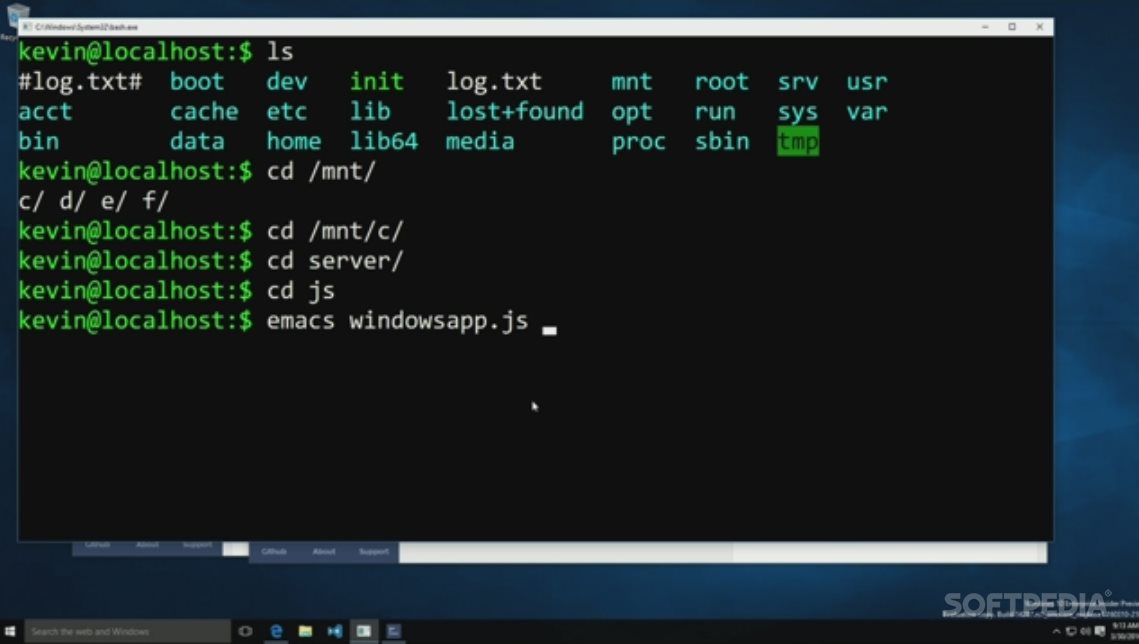
Ubuntu shell on Windows 10

Ubuntu shell on Windows 10

Via Softpedia

Terbaru

  • Inilah 10 Jurusan Terfavorit di Universitas Brawijaya Buat SNBT 2026, Saingannya Ketat Banget!
  • Inilah Cara Terbaru Login dan Ubah Password Akun PTK di EMIS GTK IMP 2026
  • Inilah Batas Maksimal Zakat untuk Pengurang Pajak, Ternyata Begini Aturannya!
  • Inilah Cara Mengenali Aplikasi Bodong Penghasil Uang Agar Kalian Nggak Jadi Korban Penipuan Digital
  • Apa itu Error Kode LADK3 saat Buka Rekening Brimo? Dan Solusinya!
  • BOHONG??? Inilah Rincian Anggaran Makan Bergizi Gratis, Ternyata Uang Bahan Makanannya Nggak Sampai Rp15.000!
  • Inilah Tugas Proktor Ujian TKA SD/SMP 2026, Baca Dulu Ada Yang Beda!
  • Tips Pajak Coretax: Inilah Cara Memastikan Lembaga Amil Zakat yang Sah Agar Pajak Kalian Berkurang!
  • Kenapa FreeFire Advance Server Tidak Bisa Diunduh? Ini Penjelasannya!
  • Inilah Realita Biaya Hidup Mahasiswa di Bogor: Ternyata Nggak Semahal yang Kalian Kira!
  • Inilah Cara Blokir Email Spam di Gmail Biar Penyimpanan Nggak Gampang Penuh
  • Inilah Cara Aktivasi Keaktifan PTK di EMIS GTK IMP 2026 Biar Tunjangan Cair Lancar!
  • Inilah Cara Menilai Sumbangan yang Disetarakan dengan Uang Supaya Pajak Kalian Berkurang
  • Apa itu Pin di iMessage?
  • SKTP Nggak Muncul di Info GTK padahal Sudah Terbit? Ini Trik Rahasia Biar Data Langsung Update!
  • Ini Trik Nuyul Cari Cuan di Game Puzzle Farm 2026 Biar Koin Melimpah Tanpa Undang Teman
  • Inilah Ukuran Kertas Thermal 58mm ISO Di Word, Berapa dan Panduan Lengkap Memilihnya
  • Bukan Cuma Zakat! Ternyata Sumbangan Jenis Ini Bisa Ngurangin Pajak Kalian! Simak Penjelasannya
  • Inilah Caranya Mengajar Bahasa Indonesia di Amerika Serikat Lewat Beasiswa Fulbright FLTA 2026
  • Inilah 6 Rekomendasi HP yang Awet dan Tahan Lama Biar Kalian Nggak Gonta-ganti Terus!
  • Apa itu Proses BOP dan Psikotes BRI Life?
  • Ini Cara Input Tugas Tambahan Guru di EMIS GTK IMP 2026 Biar Jam Mengajar Aman!
  • APK Juice Pack Frenzy Penipuan? Benarkah Membayar atau Cuma Tipuan Iklan? Ini Faktanya!
  • Apakah Apk ReelAct Penipu? Mau Tarik 100 Dolar dari Reel Act? Cek Dulu Faktanya Biar Nggak Rugi Waktu!
  • Inilah Rekomendasi Game Turn Base Android dan PC Terbaik Buat Kalian yang Suka Strategi!
  • Inilah Cara Membuat Sertifikat di Canva dan Ukuran Standar yang Wajib Kalian Tahu
  • Inilah Aturan Zakat yang Bisa Jadi Pengurang Pajak Bruto Kalian, Sudah Tahu Belum?
  • Inilah Data Pendaftar KIP Kuliah 2026 Jalur SNBP dan Bocoran Kriteria yang Lolos!
  • Inilah Game Silent Hill: Townfall, Teror Psikologis Baru yang Bakal Bikin Kalian Gemetar di Tahun 2026!
  • Inilah Trailer Mortal Kombat 2, Johnny Cage Resmi Gabung dan Siap Hadapi Shao Kahn!
  •  How to Fix ‘docs.google.com Refused to Connect’ Error in Windows 10/11
  • Aerynos Feb 2026 Update: Faster Desktops and Moss Performance Boost
  • Pangolin 1.16 Adds SSH Auth Daemon: What You Need to Know
  •  How to Fix Windows Audio Endpoint Builder Service Not Starting Errors
  • What’s New in elementary OS 8.1.1 with Linux Kernel 6.17?
  • Prompt AI Menyusun Script Pola Suara Karakter agar Brand Jadi Ikonik
  • Prompt AI untuk Merancang Karakter Brand yang Ikonik
  • Prompt AI Audit Konten Sesuai Karakter Brand
  • Prompt AI Merubah Postingan LinkedIn Jadi Ladang Diskusi dengan ChatGPT
  • Prompt AI: Paksa Algoritma LinkedIn Promosikan Konten Kalian
  • Apa itu Spear-Phishing via npm? Ini Pengertian dan Cara Kerjanya yang Makin Licin
  • Apa Itu Predator Spyware? Ini Pengertian dan Kontroversi Penghapusan Sanksinya
  • Mengenal Apa itu TONESHELL: Backdoor Berbahaya dari Kelompok Mustang Panda
  • Siapa itu Kelompok Hacker Silver Fox?
  • Apa itu CVE-2025-52691 SmarterMail? Celah Keamanan Paling Berbahaya Tahun 2025
Beli Pemotong Rumput dengan Baterai IRONHOOF 588V Mesin Potong Rumput 88V disini https://s.shopee.co.id/70DBGTHtuJ
Beli Morning Star Kursi Gaming/Kantor disini: https://s.shopee.co.id/805iTUOPRV

©2026 emka.web.id | Design: Newspaperly WordPress Theme