Skip to content

emka.web.id

menulis pengetahuan – merekam peradaban

Menu
  • Home
  • Tutorial
  • Search
Menu

What I did after installing Ubuntu 12.10

Posted on October 23, 2012

The first thing I did after installing Ubuntu 12.10 was to restore my PPAs backup from Ubuntu 12.04. That’s right, I’m addicted to PPAs. That’s because, even though Ubuntu 12.10 has the latest version of most packages, there are some apps which aren’t available in the official repositories that I can’t live without. For this I’ve used Y PPA Manager which imports the GPG keys automatically and can also update the PPAs that work with the latest Ubuntu release.

Firefox extensions and webapps.


I’m using Firefox because it works better for me with a large number of open tabs (especially since there’s an option not to load tabs until clicked). I only use three addons: Adblock Plus, Tab Badge (adds a a small badge to your tabs to alert you when you have notifications for websites like Facebook, Google Plus, etc.) and LastPass (for better password security and sync).
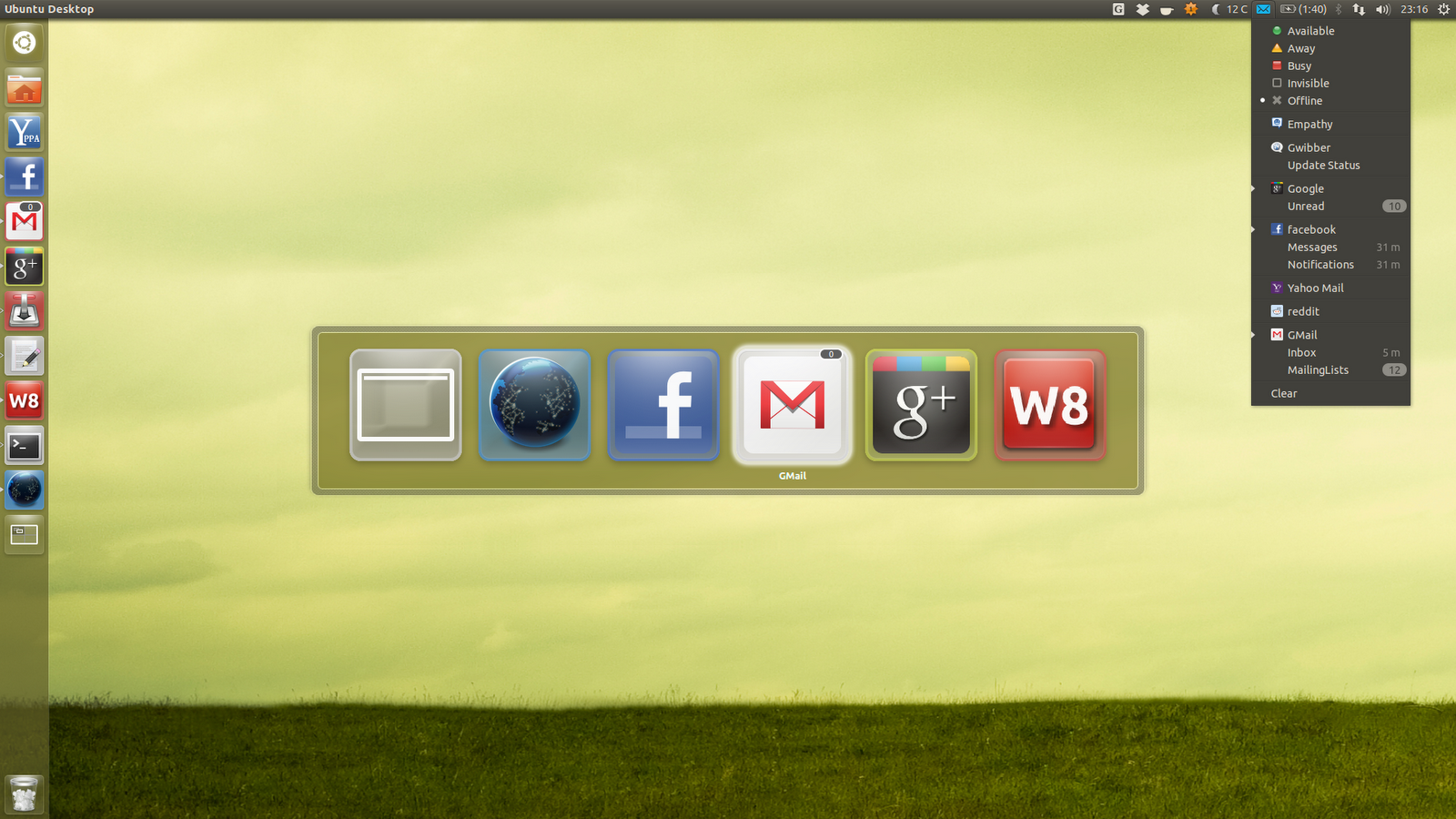
 

And speaking of browsers, I’ve also installed some webapps (they work with both Firefox and Chromium):
  • Google Plus – I don’t want to miss any posts so the notifications provided by the Google Plus webapp are really useful;
  • Facebook – integrates Facebook with the Messaging Menu, without using a separate application. Sweet!
  • Gmail – this is a really useful webapp too as it displays the number of unread emails as a badge on the Unity luncher and in the Messaging Menu, along with new email notifications (though the notifications are currently broken for me using Firefox).

More about the new webapps, HERE.

AppIndicators.


I was telling you there are some applications which I can’t live without. Well, many of them are appindicators:
  • My Weather Indicator – weather on the panel is a must for me, a feature that Ubuntu should really add by default;
  • Google Calendar Indicator (link to post) – I use Google Calendar a lot, and this appindicator is very useful, displaying future events, notifications and more;
  • Caffeine – because there’s nothing more annoying than watching a video / movie and having the screen lock pop-up in the middle of it;
  • Glippy – in my opinion, a clipboard manager is a must. Glippy is my favourite, but any will do;
  • Dropbox – Ubuntu One is nice, but there are some features for which I prefer Dropbox. It can be installed from the Ubuntu repositories repositories too.

Other applications.

  • VirtualBox – for testing the next Ubuntu release and other Linux distributions of course, something I need for WebUpd8;
  • GNOME Tweak Tool – for changing the GTK / Window theme, because at the time I’ve installed Ubuntu 12.10, the other tools like Ubuntu Tweak, MyUnity, etc. didn’t yet support 12.10 (and they still don’t fully support it yet);
  • CCSM – since Ubuntu Tweak and the other tweaking tools don’t fully support Ubuntu 12.10 yet, CCSM is the way to go right now if you want to tweak various Unity aspects;
  • Shutter – the best screenshot tool for Linux, is also one of the first applications I install since I need it for the new WebUpd8 posts;
  • Movies / music: Ubuntu Restricted Extras is a must. And for me, so are SMplayer and sometimes VLC for playing videos. For music, I use Nuvola Player because Grooveshark is all I need and it integrates nicely with the desktop, with some extra features compared to the Grooveshark webapp.

Of course, the list can get very long, but I’m trying to stick with the basics here.

Note: this post uses links to the online Ubuntu Software Center from which you can install the applications with a click. For the applications not available in the repositories, I’ve added links to the installation instructions.

What are the things you’ve done after installing (or upgrading to) Ubuntu 12.10?


Now it’s your turn! What did you install or tweak after you’ve started using the latest Ubuntu 12.10, be it the default favour, Ubuntu GNOME Remix or X/K/Lubuntu? And even if you’re not using Ubuntu 12.10 yet, what are the first things you do after installing Ubuntu?

Terbaru

  • SEO LinkedIn: Inilah Alasan Kenapa LinkedIn Ads Lebih Efektif Buat Bisnis B2B Dibanding Platform Lain
  • Inilah Alasan Kenapa Kolom Komentar YouTube Kalian Sering Menghilang Secara Misterius!
  • Cara Kelola Auto-Posting Semua Media Sosial Kalian Pakai Metricool
  • Studi Kasus Sukses Instagram Maria Wendt Dapat 12 Juta View Instagram Per Bulan
  • ZenBook S16, Vivobook Pro 15 OLED, ProArt PX13, dan ROG Zephyrus G14, Laptop Bagus dengan Layar OLED!
  • Caranya Ngebangun Website Directory dengan Traffic Tinggi dalam Seminggu!
  • Cara Mengembangkan Channel YouTube Shorts Tanpa Wajah
  • Inilah Cara Menghitung Diskon Baju Lebaran Biar Nggak Bingung Saat Belanja di Mall!
  • Cara Jitu Ngebangun Bisnis SaaS di Era AI Pakai Strategi Agentic Workflow
  • Inilah Rincian Gaji Polri Lulusan Baru 2026, Cek Perbedaan Jalur Akpol, Bintara, dan Tamtama Sebelum Daftar!
  • Inilah 5 Channel YouTube Membosankan yang Diam-diam Menghasilkan Banyak Uang
  • Inilah Cara Pakai Google Maps Offline Biar Mudik Lebaran 2026 Nggak Nyasar Meski Tanpa Sinyal!
  • Inilah Alasan Mahkamah Agung Tolak Kasasi Google, Denda Rp202,5 Miliar Resmi Menanti Akibat Praktik Monopoli
  • Inilah Cara Daftar dan Syarat SPMB SMK Boarding Jawa Tengah 2026, Sekolah Gratis Sampai Lulus!
  • Inilah Daftar Sekolah Kedinasan 2026 untuk Lulusan SMK, Bisa Kuliah Gratis dan Berpeluang Besar Langsung Jadi CPNS!
  • Inilah Pajak TER: Skema Baru PPh 21 yang Nggak Bikin Pusing, Begini Cara Hitungnya!
  • Inilah Jadwal Resmi Jam Buka Tol Jogja-Solo Segmen Prambanan-Purwomartani Saat Mudik Lebaran 2026
  • Inilah Cara Mendapatkan Witherbloom di Fisch Roblox, Rahasia Menangkap Ikan Paling Sulit di Toxic Grove!
  • Kenapa Indomart Point Bisa Kalahkan Bisnis Kafe?
  • Inilah Cara Mendapatkan Rotten Seed di Fisch Roblox, Lokasi Rahasia di Toxic Grove Buat Unlock Toxic Lotus!
  • Inilah Cara Zakat Crypto Kalian Bisa Jadi Pengurang Pajak Berdasarkan Aturan Resmi Pemerintah!
  • Inilah Perbandingan Airwallex vs Payoneer 2026: Jangan Sampai Profit Kalian Ludes Gara-Gara Biaya Admin!
  • Inilah Roadmap 7 Tahap Bangun Bisnis Digital dari Nol Biar Nggak Cuma Putar-Putar di Tempat!
  • Inilah Cara Tetap Gajian dari YouTube Meski View Masih Ratusan, Penasaran?
  • Inilah Alasan Akun TikTok Affiliate GMV 270 Juta Kena Banned Permanen!
  • Inilah Bahaya Astute Beta Server APK, Jangan Sembarang Klik Link Download FF Kipas 2026!
  • Inilah Bahaya Nonton Film di LK21 dan IndoXXI, Awas Data Pribadi dan Saldo Rekening Kalian Bisa Ludes!
  • Inilah Kronologi & Video Lengkap Kasus Sejoli Tambelangan Sampang Viral, Ternyata Gini Awal Mulanya!
  • Inilah Alasan Kenapa Koin Nego Neko Shopee Nggak Bisa Dipakai Bayar Full dan Cara Rahasia Dapetinnya!
  • Inilah Cara Menjawab Pertanyaan Apakah di Sekolahmu Sudah Ada IFP/PID dengan Benar dan Profesional
  • What is the 99% Deletion Bug? Understanding and Fixing Windows 11 File Errors
  • How to Add a Password to WhatsApp for Extra Security
  • How to Recover Lost Windows Passwords with a Decryptor Tool
  • How to Fix Python Not Working in VS Code Terminal: A Troubleshooting Guide
  • Game File Verification Stuck at 0% or 99%: What is it and How to Fix the Progress Bar?
  • How to Build a Full-Stack Mobile App in Minutes with YouWare AI
  • How to Create Consistent Characters and Cinematic AI Video Production with Seedance
  • How to Find Your Next Viral Product Using PiPiAds AI Like a Pro!
  • Create Your Own Netflix-Style Documentaries Using AIQORA in Minutes!
  • How to Build a Super Chatbot with RAG Gemini Embbeding & Claude Code
  • Apa itu Spear-Phishing via npm? Ini Pengertian dan Cara Kerjanya yang Makin Licin
  • Apa Itu Predator Spyware? Ini Pengertian dan Kontroversi Penghapusan Sanksinya
  • Mengenal Apa itu TONESHELL: Backdoor Berbahaya dari Kelompok Mustang Panda
  • Siapa itu Kelompok Hacker Silver Fox?
  • Apa itu CVE-2025-52691 SmarterMail? Celah Keamanan Paling Berbahaya Tahun 2025

©2026 emka.web.id | Design: Newspaperly WordPress Theme