Skip to content

emka.web.id

menulis pengetahuan – merekam peradaban

Menu
  • Home
  • Tutorial
  • Search
Menu

What I did after installing Ubuntu 12.10

Posted on October 23, 2012

The first thing I did after installing Ubuntu 12.10 was to restore my PPAs backup from Ubuntu 12.04. That’s right, I’m addicted to PPAs. That’s because, even though Ubuntu 12.10 has the latest version of most packages, there are some apps which aren’t available in the official repositories that I can’t live without. For this I’ve used Y PPA Manager which imports the GPG keys automatically and can also update the PPAs that work with the latest Ubuntu release.

Firefox extensions and webapps.


I’m using Firefox because it works better for me with a large number of open tabs (especially since there’s an option not to load tabs until clicked). I only use three addons: Adblock Plus, Tab Badge (adds a a small badge to your tabs to alert you when you have notifications for websites like Facebook, Google Plus, etc.) and LastPass (for better password security and sync).
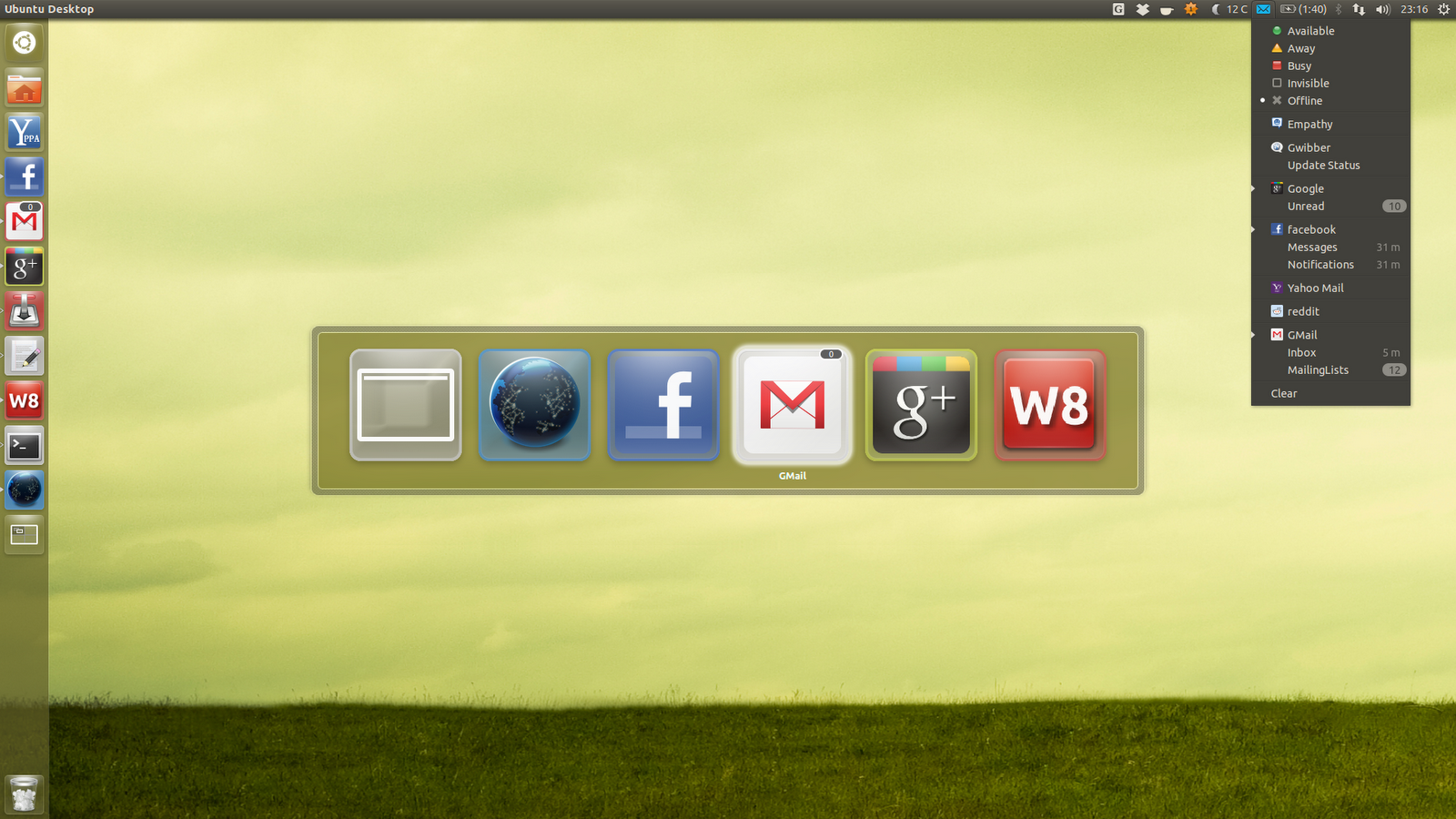
 

And speaking of browsers, I’ve also installed some webapps (they work with both Firefox and Chromium):
  • Google Plus – I don’t want to miss any posts so the notifications provided by the Google Plus webapp are really useful;
  • Facebook – integrates Facebook with the Messaging Menu, without using a separate application. Sweet!
  • Gmail – this is a really useful webapp too as it displays the number of unread emails as a badge on the Unity luncher and in the Messaging Menu, along with new email notifications (though the notifications are currently broken for me using Firefox).

More about the new webapps, HERE.

AppIndicators.


I was telling you there are some applications which I can’t live without. Well, many of them are appindicators:
  • My Weather Indicator – weather on the panel is a must for me, a feature that Ubuntu should really add by default;
  • Google Calendar Indicator (link to post) – I use Google Calendar a lot, and this appindicator is very useful, displaying future events, notifications and more;
  • Caffeine – because there’s nothing more annoying than watching a video / movie and having the screen lock pop-up in the middle of it;
  • Glippy – in my opinion, a clipboard manager is a must. Glippy is my favourite, but any will do;
  • Dropbox – Ubuntu One is nice, but there are some features for which I prefer Dropbox. It can be installed from the Ubuntu repositories repositories too.

Other applications.

  • VirtualBox – for testing the next Ubuntu release and other Linux distributions of course, something I need for WebUpd8;
  • GNOME Tweak Tool – for changing the GTK / Window theme, because at the time I’ve installed Ubuntu 12.10, the other tools like Ubuntu Tweak, MyUnity, etc. didn’t yet support 12.10 (and they still don’t fully support it yet);
  • CCSM – since Ubuntu Tweak and the other tweaking tools don’t fully support Ubuntu 12.10 yet, CCSM is the way to go right now if you want to tweak various Unity aspects;
  • Shutter – the best screenshot tool for Linux, is also one of the first applications I install since I need it for the new WebUpd8 posts;
  • Movies / music: Ubuntu Restricted Extras is a must. And for me, so are SMplayer and sometimes VLC for playing videos. For music, I use Nuvola Player because Grooveshark is all I need and it integrates nicely with the desktop, with some extra features compared to the Grooveshark webapp.

Of course, the list can get very long, but I’m trying to stick with the basics here.

Note: this post uses links to the online Ubuntu Software Center from which you can install the applications with a click. For the applications not available in the repositories, I’ve added links to the installation instructions.

What are the things you’ve done after installing (or upgrading to) Ubuntu 12.10?


Now it’s your turn! What did you install or tweak after you’ve started using the latest Ubuntu 12.10, be it the default favour, Ubuntu GNOME Remix or X/K/Lubuntu? And even if you’re not using Ubuntu 12.10 yet, what are the first things you do after installing Ubuntu?

Terbaru

  • Kode 0425 Daerah Mana? Ini Pengertian dan Fakta Sebenarnya
  • Apa Itu SSS CapCut? Pengertian Downloader Video Tanpa Watermark yang Wajib Kalian Tahu
  • Apa Itu Paket GamesMAX Telkomsel? Ini Pengertian dan Fungsinya Bagi Gamers
  • Apa Itu Menu Plus di Google Search? Ini Pengertian dan Fungsinya
  • Apa Itu Lepas Kolpri? Ini Pengertian dan Fenomenanya di Dunia Gaming
  • Pixel Buds Pro Dapat Update Software dengan Dukungan ANC Adaptif dan Peningkatan Audio
  • Mous Pixel Watch 4 Akan Hadir dengan Charger Baru dan Fitur-Fitur Terbaru
  • Hati-hati, Video Asli Botol Golda Viral Season 4 Full 6.30 Menit, Cek Link dan Faktanya disini!
  • Google Docs Dapat Update Material 3 dan Desain Ekspresif Baru, Fokus pada Kreativitas dan Kolaborasi
  • Belum Tahu? Ini Trik Hitung Cost Per Gigabyte Supaya Gak Boncos Saat Beli Paket Internet
  • Apple TV dan Google Cast Akan Terintegrasi Lebih Dalam, Tawarkan Pengalaman Streaming yang Lebih Baik
  • Lagi Rame Botol Golda Viral 19 Detik? APA ITU? Jangan Asal Klik Link Sembarangan, Ini Bahayanya!
  • Apa itu Regedit FF Auto Headshot 100 No Password 2024? Simak Definisi dan Cara Kerjanya
  • Apa Itu KPH dan MPH? Pengertian dan Perbedaannya di Game Balap
  • Belum Tahu? Inilah Cara Aman Quotex Login dan Solusi Kalau Error!
  • Apa Itu Fitur Gestur Baru di Pixel Watch 4? Ini Pengertian dan Perbedaannya
  • Belum Tahu? Inilah Cara Aman Login Binomo dan Trik Trading Buat Pemula Biar Nggak Boncos
  • Cara Mengatasi Error ‘Versi Diagnostik Belum Terbarui’ (Your current version of diagnostics is not up to date)
  • Cara Membuat Newsletter di Outlook 365
  • Sering Telepon di Tempat Berisik? Fitur Baru Expressive Call dari Google Bakal Jadi Penyelamat Kalian!
  • Google Pixel 10 Pro Akan Punya Integrasi Play Points Lebih Dalam
  • Stop Cara Kuno! Ini Trik Supaya Manajemen Karyawan Jadi Lebih Cepat dan Anti Ribet
  • Bug di Aplikasi Cuaca Wear OS Google: Update Tidak Ngaruh!
  • Samsung Kembangkan Sensor Kamera Baru Pakai Teknologi Global Shutter dan Efek Blur Bergerak
  • Cara Membuat Anggaran Otomatis di Excel
  • Baseus X1 Pro Kamera: Kamera Ringkas dengan Fitur Canggih dan Harga yang Menarik
  • Profil Sosmed Kalian Sepi? Gini Caranya Makeover Bio Biar Makin Dilirik Sama Netizen!
  • Cara Mengatasi Error ‘Disk is Full or Read-Only’
  • Belum Tahu? Inilah Trik Ampuh Atasi Error ‘We Were Unable To Create Your Notebook’ di OneNote
  • Trik Instagram Stories 2025: Ubah Viewer Jadi Loyal Follower dengan Fitur Sederhana Ini
  • Ini Dia ESP32 P4: IoT RISC-V dengan Layar AMOLED dan LoRa, Perangkat Handheld Inovatif
  • Apa Itu HealthyPi-6? Solusi Open Source untuk Akuisisi Biosignal
  • Jetson THOR Industrial PC: 25Gbe Networking dan Bisa Pakai Kamera GMSL2
  • Azul Systems Akuisisi Payara Java Server
  • PC Kentang Jadi Ngebut? Coba GRML 2025, Distro Debian Ringan dengan Kernel 6.17!
  • Apa Itu US National Framework for AI? Kepres Donald Trump Bikin Heboh Dunia AI
  • Kenapa Bisnis Properti & Real Estate Harus Pakai AI, Ini Alasannya!
  • BARU! Brave Browser Bakal Bisa Ngerjain Tugas Kalian Secara Otomatis Lewat Agentic AI!
  • Belum Tahu? Google Maps Bakal Makin Canggih Berkat Integrasi Gemini Visual Ini!
  • Siap-Siap! Tahun 2026 Gemini Bakal “Menjajah” Chrome, iPhone, sampai Smartwatch Kalian
  • Apa Itu Video PT Pabrik Brebes Viral? Ini Pengertian dan Fakta Sebenarnya
  • Apa itu Data Breach Coupang? Pengertian dan Kronologi Kebocoran Data Terbesar di Korea Selatan
  • Apa Itu CVE-2018-4063? Pengertian Celah Keamanan Sierra Wireless AirLink yang Masuk Katalog CISA
  • Apa Itu Ashen Lepus? Kelompok Peretas yang Mengincar Instansi Pemerintah Timur Tengah
  • Pengertian Vulnerability WebKit Apple Terbaru: Apa Itu CVE-2025-43529 dan CVE-2025-14174?

©2025 emka.web.id | Design: Newspaperly WordPress Theme