Skip to content

emka.web.id

menulis pengetahuan – merekam peradaban

Menu
  • Home
  • Tutorial
  • Search
Menu

Tutorial Windows: Three Ways to Make the Windows 10 Start Menu a Lot Faster

Posted on September 1, 2015

The Start menu comes with a completely new look in Windows 10 and borrows live tiles from the Windows 8 Start screen, as Microsoft tried to make it not only look better and feel fresh, but also to be more effective by providing users with info without the need for launching apps.

And yet, some of the features that have been implemented by Microsoft to overhaul the Start menu not necessarily slow it down, but they certainly make it feel this way, so turning them off could actually be the best way to turn everything blazing fast in Windows 10.

So today, we’ll show you three different ways to speed up the Windows 10 Start menu with just a few clicks, so you won’t lose more than a couple of minutes to set it up.

#1 – Disable Start menu animations

First and foremost, the animations that Microsoft introduced in Windows 10 make the Start menu feel somewhat slower, simply because before actually opening the Start menu, the operating system needs to render this animation.

So disabling these animations is the way to go. Unfortunately, these visual effects are OS dependent, which means that once you turn them off, you disable all animations in Windows 10. And yet, if you’re ready to make this compromise, go over to the next path and disable the option that says “Play animations in Windows.”

Settings > Ease of Access > Other options > Play animations in Windows
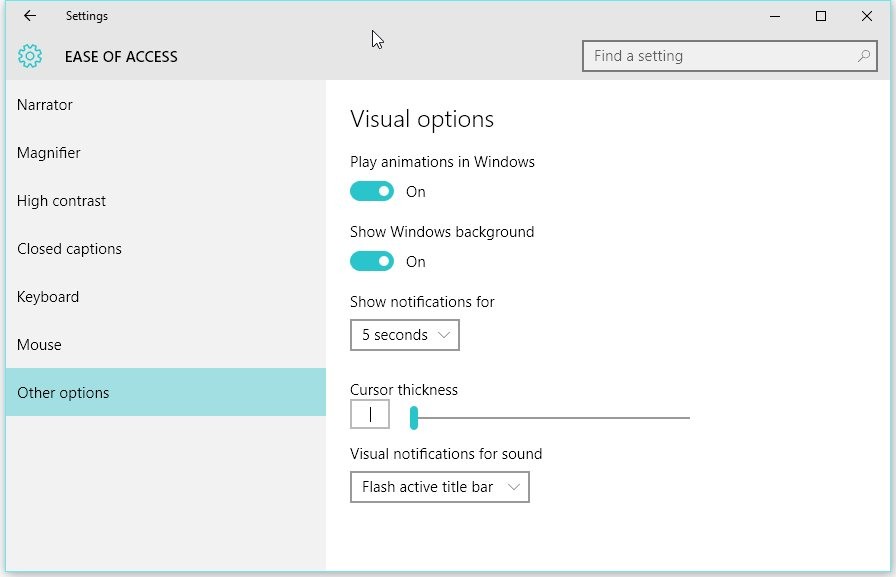
Disable animations in Windows 10

Disable animations in Windows 10

#2 – Disable web search in the Start menu

Whenever you start typing in the Start menu, Windows 10 triggers the same behavior as in Windows 8.1, so it launches the search feature and looks for information both online and offline as you type.

Obviously, searching the web could take a second or two, depending on your Internet connection, so turning this feature off could come in handy.

To do that, click on the search icon in your taskbar, hit the settings icon in the left menu and disable the feature reading “Search online and include web results.” This also helps protect your privacy, as you can read below the option, because Microsoft collects some information to improve its services.
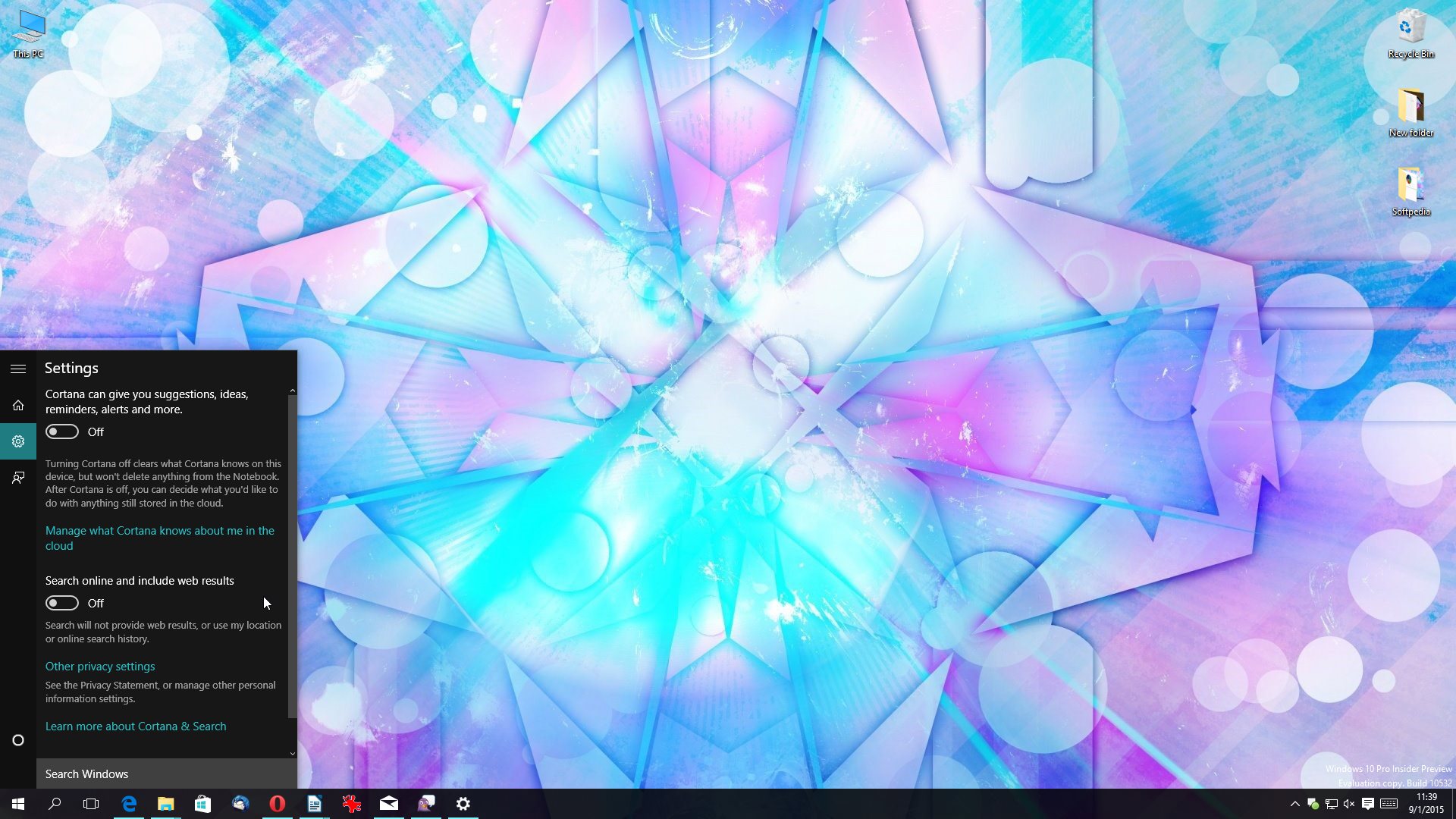
Disable web search in the Start menu

Disable web search in the Start menu

#3 – Choose indexing options

The search feature comes with another option that could slow down the Start menu when searching. By default, the search feature integrated into Windows 10 indexes all files on your PC, so imagine that when you perform a search, it looks on your entire hard drive and online to find your results.

If you don’t want to search specific folders or drives on your PC, click the Start menu and type “Indexing options.”

Here you are allowed to choose which folders you want to be indexed and which not. Hit the modify button at the bottom of the screen and pick the locations you want to index.
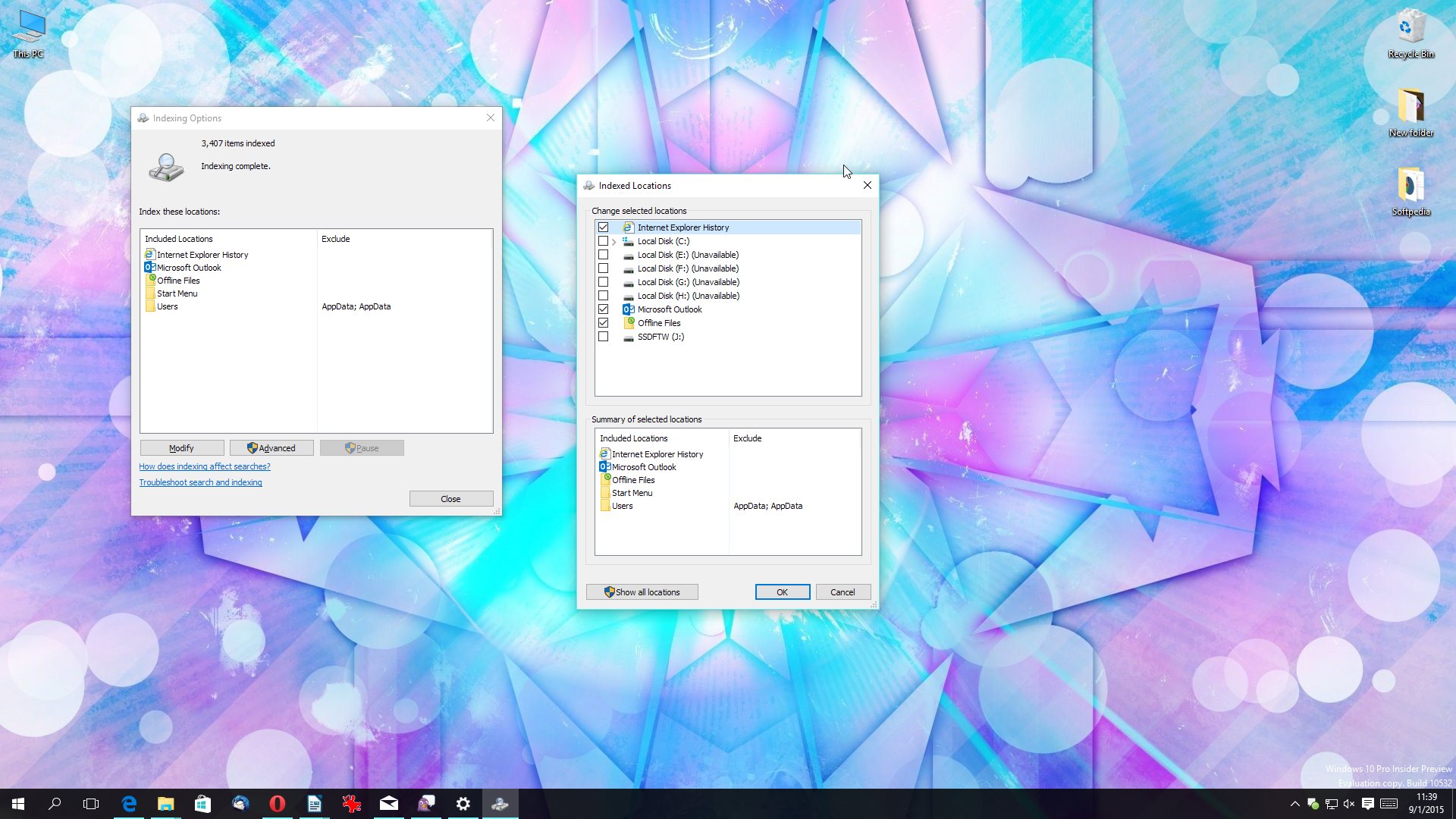
Indexing options in Windows 10

Indexing options in Windows 10

Bonus tip – Remove live tiles

We’ve received tips from our readers saying that in some cases, the live tiles could also contribute to this somewhat slowed down Start menu feeling, so in order to get rid of this, simply remove all the tiles.

Basically, this should also help those who still prefer the Windows 7 layout, as a Start menu without live tiles looks not only cleaner, but also more familiar for those upgrading from Windows 7.

Terbaru

  • Inilah Penyebab Data Seluler Tidak Bisa Digunakan Padahal Sudah Aktif dan Solusi Praktis Mengatasinya
  • Inilah Kenapa Canva Error 503 Tidak Bisa Dibuka Hari Ini dan Cara Mengatasinya Sampai Layanan Kembali Normal
  • Inilah Cerita Hangat di Balik Muscab PKB Kebumen: Dari Urusan Dapur Hingga Strategi Pemenangan 2029!
  • Inilah Kronologi dan Identitas 4 WNI yang Disandera Perompak Somalia di Kapal MT Honour 25
  • Inilah Alasan PKB Kaji Ulang Ambang Batas DPRD Biar Sejalan Sama Putusan MK
  • Inilah Jadwal Pengumuman Hasil TKA SD dan SMP 2026 dan Cara Cek Skor Kalian Secara Online
  • Inilah HP Gaming Vivo Terbaik 2026 yang Paling Gahar, Main Game Berat Nggak Pake Ngelag!
  • Inilah Potensi Pajak Selat Malaka yang Bikin Rame, Ternyata Gini Cara Mainnya Biar Nggak Melanggar Hukum Internasional
  • Inilah Alasan Kenapa Sinkhole Sering Muncul di Indonesia dan Cara Mengenali Tanda-Tandanya Supaya Kalian Tetap Aman
  • Inilah Program PJJ 2026 untuk Anak Tidak Sekolah, Cara Mudah Masuk SMA Tanpa Harus ke Kelas Tiap Hari!
  • Inilah Program SPMB 2026 PJJ Khusus Anak Tidak Sekolah, Solusi Buat yang Pengen Balik Belajar!
  • Inilah Cara Kuliah di Al-Azhar Mesir Lewat Jalur Kemenag 2026, Lengkap dengan Syarat dan Jadwalnya!
  • Inilah Jadwal Lengkap Jalur Mandiri Unud 2026, Persiapkan Diri Kalian Sebelum Menyesal!
  • Inilah 8 Universitas Swasta Terbaik di Indonesia Versi THE Asia University Rankings 2026 yang Bisa Jadi Pilihan Kuliah Kamu
  • Inilah Jadwal Terbaru SSU ITB 2026 yang Diperpanjang, Lengkap dengan Syarat dan Rincian Biayanya!
  • Inilah 10 Jurusan Kuliah Paling Dicari Perusahaan Tahun 2026, Cek Daftarnya Biar Nggak Salah Pilih!
  • Inilah Cara Daftar Beasiswa Tut Wuri Handayani 2026, Kesempatan Emas Buat PNS Kemendiktisaintek Tingkatkan Karier!
  • Inilah Ketentuan Lengkap TKA Susulan 2026 SD dan SMP, Cek Syarat dan Jadwal Resminya Di Sini!
  • Inilah Kurikulum Berbasis Cinta Madrasah: Panduan Lengkap dan Link Download PDF Terbaru 2026
  • Inilah Kronologi Mencekam Kecelakaan KA Argo Bromo Anggrek Tabrak KRL di Bekasi Timur yang Bikin Jalur Kereta Lumpuh Total
  • Inilah Alasan Kenapa Hari Libur dan Tanggal Penting Selalu Ditulis Pakai Warna Merah di Kalender
  • Inilah Cara Daftar Jalur Prestasi Politeknik PU Semarang 2026, Kesempatan Kuliah di Kampus Kementerian PU!
  • Inilah Cara Cek Bansos PKH dan BPNT 2026 Lewat HP, Lengkap dengan Jadwal Cair dan Besaran Dananya!
  • Inilah Alasan Kemdiktisaintek Bakal Tutup Banyak Jurusan Kuliah yang Nggak Relevan dengan Industri
  • Inilah Status Libur Hari Pendidikan Nasional 2026 dan Sejarah Penting di Baliknya
  • Inilah Daftar Libur Mei 2026 yang Bikin Full Senyum, Siapkan Rencana Liburan Kalian Sekarang!
  • Inilah Daftar Universitas Terbaik di Jepang Versi THE Asia University Rankings 2026, Kampus Mana yang Jadi Incaran Kalian?
  • Inilah Alasan Kenapa Kemdiktisaintek Bakal Tutup Sejumlah Prodi dan Fokus ke 8 Industri Strategis
  • Inilah Sosok Richard Aldrich McCurdy, Penguasa Asuransi yang Terjerat Skandal di Masa Gilded Age
  • Inilah Alasan Suhu Bumi Naik Drastis dan Cara Kita Menghadapi Ancaman Cuaca Ekstrem
  • How to Transform Your Windows 11 Interface into a Sleek and Modern Aesthetic Masterpiece
  • How to Understand Google’s New TPU 8 Series for Massive AI Training and Inference
  • How to Level Up Your PC Gaming Experience with the New Valve Steam Controller and Its Advanced Features
  • Is it Time to Replace Nano? Discover Fresh, the Terminal Text Editor You Actually Want to Use
  • How to Design a Services Like Google Ads
  • How to set up your own OpenClaw autonomous AI agent to manage your work and digital life efficiently
  • Xiaomi MiMo-V2.5-Pro Full Test: How to Build Incredible AI-Powered Projects with A Trillion-Parameter Guide for Young Developers!
  • NVIDIA Nemotron 3 Omni is Released!
  • How to use Google Veo 3 for free and generate high-quality AI videos without any expensive subscriptions or complex software
  • How to build professional AI projects that turn your GitHub portfolio into a job magnet
  • Apa itu Spear-Phishing via npm? Ini Pengertian dan Cara Kerjanya yang Makin Licin
  • Apa Itu Predator Spyware? Ini Pengertian dan Kontroversi Penghapusan Sanksinya
  • Mengenal Apa itu TONESHELL: Backdoor Berbahaya dari Kelompok Mustang Panda
  • Siapa itu Kelompok Hacker Silver Fox?
  • Apa itu CVE-2025-52691 SmarterMail? Celah Keamanan Paling Berbahaya Tahun 2025

©2026 emka.web.id | Design: Newspaperly WordPress Theme