Skip to content

emka.web.id

menulis pengetahuan – merekam peradaban

Menu
  • Home
  • Tutorial
  • Search
Menu

Linux News Today: Canonical Announces Ubuntu on Windows 10, an Ubuntu Userspace for Windows Devs

Posted on March 31, 2016

Dustin Kirkland, Ubuntu Product and Strategy at Canonical, is attending the Microsoft Build 2016 developer conference that takes place this week in San Francisco, between March 30 and April 1, 2016, and he was proud to announce the “Ubuntu on Windows” project.

Everyone was talking today about the rumors ZDNet started on the matter of a new, secret partnership between Canonical and Microsoft to bring the Ubuntu shell to Windows 10, natively integrated into a Windows 10 cmd.exe console, and guess what? The rumors proved to be true after all.

Canonical has just announced Ubuntu on Windows, a new project created in collaboration with Microsoft to bring the Ubuntu user space to the Windows 10 platform, for Windows developers working on cross-platform applications, helping them be more productive.

“I embarked on a super secret (and totally mind boggling!) project between Microsoft and Canonical, as unveiled today in a demo during Kevin Gallo‘s opening keynote of the Build conference,” said Dustin Kirkland. “An Ubuntu user space and bash shell, running natively in a Windows 10 cmd.exe console!”

Here’s how Ubuntu on Windows works

An interesting project indeed, but don’t get too excited about it, because, as said before, it’s here only for developers who want to be more productive working on cross-platform applications, for both Windows and Linux (not that there are too many of those lately) and don’t have time to switch between different operating systems.

Basically, if you’re using Windows 10 to develop cross-platforms apps, with the “Ubuntu on Windows 10” project you’ll be able to access the Linux bash shell directly from the Windows Start menu. Just type “bash” (without quotes), press Enter, and a cmd.exe console will open, running the /bin/bash binary from Ubuntu.

The project currently gives users full access to all of Ubuntu’s user space, as well as tens of thousands binary packages available in the Ubuntu repos, including, but not limited to, commands like apt, ssh, rsync, find, grep, vim, emacs, awk, sed, ruby, tar, sort, php, mysql, perl, python, wget, md5sum, gpg, curl, apache, gcc, diff, as well as patch.

“The native availability of a full Ubuntu environment on Windows, without virtualization or emulation, is a milestone that defies convention and a gateway to fascinatingly unfamiliar territory,” said Mark Shuttleworth, Canonical CEO. “Nevertheless, we are delighted to stand behind Ubuntu for Windows, committed to addressing the needs of Windows developers exploring Linux in this amazing new way.”

Why not use a real Ubuntu box for your development needs?

And this is what the super secret “Ubuntu on Windows” project looks like, for now, and to be honest, we don’t understand why we need it. OK, we get that it’s here to help you be more productive when developing cross-platform apps, but why not use a real Ubuntu box or, at least, a virtual machine with Ubuntu Linux on top of Windows.

Or why not dual boot Windows 10 with Ubuntu like many developers do these days. Well, the truth is that you are free to use whatever you want, whenever you want. No one is forcing you to use Windows 10 with the Ubuntu bash running natively, and you can always rely on your full-fledged Linux box, with all of its great features, always free of charge!
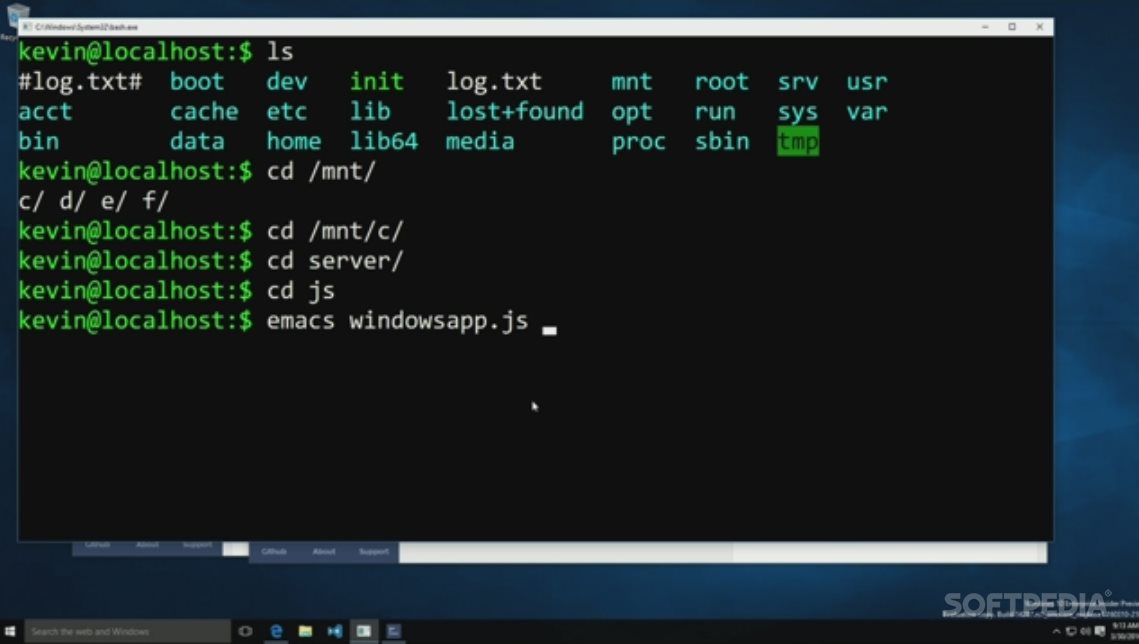
Ubuntu shell on Windows 10

Ubuntu shell on Windows 10

Via Softpedia

Terbaru

  • Survei Parpol Terbaru: Gerindra Unggul, PDIP Ketiga, PKB 5%
  • PKB Resmi Jalin Kerjasama dengan Institut Teknologi & Sains NU Kalimantan
  • Inilah Urutan Terbaru Pangkat TNI Angkatan Darat! (Update 2026)
  • Inilah Panduan Lengkap Operator Sekolah Mengelola SPTJM e-Ijazah dan Menghindari Kesalahan Fatal Data Kelulusan
  • Inilah Syarat dan Penilaian Seleksi Siswa Unggul ITB Jalur UTBK
  • Download Video Viral Guru Bahasa Inggris? Awas Berisi Virus!
  • PKB Minta Kasus C4bul Pendiri Ponpes Pati Tidak Ada Ampunan & Tuntutan Maksimal
  • Inilah Kronologi Video Viral Preman vs Sopir Di Sumedang
  • Ini Alasan UKP Pariwisata Disindir Konten Kreator Drone Gunung Rinjani
  • Inilah Kronologi Viral Video Dugaan Asusila Pegawai Disdik Pasuruan di Mobil Dinas
  • Polisi Polda Sumut Resmi Dipecat: Dari Video Viral Sampai Sidang Etik Ini Kronologinya
  • ASUS ExpertBook Ultra: Produk Flagship yang Cerminkan Kepemimpinan ASUS di Pasar Global
  • Inilah Tahapan dan Syarat Pendaftaran Beasiswa Garuda 2026 Gelombang II (25 Mei – 25 Juni 2026)
  • Ini Maksud Soal Tugas Guru Non-ASN Berakhir 2027!
  • Apa Itu Siscamling? Inilah Cara Mengaktifkan Paket Anti Spam Telkomsel
  • Sah, Nilai TKA Jadi Salah Satu Komponen Seleksi Siswa SPMB Secara Nasional 2026
  • Inilah 3 Lagi Pinjol Ilegal Menurut OJK Tahun 2026
  • Cara Login Proktor Browser OSN Mode Online, Uji Coba OSN Semua Jenjang Terbaru
  • Inilah Link Web Komunikasi OSN 2026 anbk.kemendikdasmen.go.id/osnk ANBK Kemendikdasmen untuk Simulasi
  • Inilah Jadwal Pembagian Deviden BBRI 2026, Siap-siap!
  • Ini Alasan Kenapa Followers IG Berkurang Sendiri Mei 2026?
  • Panduan Download vhd-osnk-2025_fresh versi 29.25.5.0 untuk Uji Coba OSN-K SMA SMP Sederajat 2026
  • Iniloh Syarat dan Komponen Nilai Seleksi Siswa Unggul ITB Jalur Nilai Rapor 2026/2027
  • Inilah Syarat dan Prosedur Ikut Seleksi Siswa Unggul ITB Jalur Tes Tulis 2026/2027
  • Inilah Kronologi & Latar Belakang Kasus Erin Taulany vs ART Hera: Masalah Facebook Pro?
  • Inilah Alasan Kenapa Ending Film Children of Heaven diubah di Indonesia
  • Ini Alasan Hanny Kristianto Cabut Sertifikat Mualaf Richard Lee
  • Inilah Syarat Dokumen SSU ITB 2024-2026 yang Wajib Kalian Siapkan Supaya Nggak Gagal Seleksi Administrasi
  • Inilah Episyrphus Balteatus, Lalat Unik Penyamar yang Sangat Bermanfaat bagi Taman Kalian
  • Inilah Cara Lolos Seleksi Siswa Unggul ITB Lewat Jalur Tes Tulis Biar Jadi Mahasiswa Ganesha
  • How to build a high-performance private photo cloud with Immich and TrueNAS SCALE
  • How to Build an Endgame Local AI Agent Setup Using an 8-Node NVIDIA Cluster with 1TB Memory
  • How to Master Windows Event Logs to Level Up Your Cybersecurity Investigations and SOC Career
  • How to Build Ultra-Resilient Databases with Amazon Aurora Global Database and RDS Proxy for Maximum Uptime and Performance
  • How to Build Real-Time Personalization Systems Using AWS Agentic AI to Make Every User Feel Special
  • How to Use Anthropic’s New AI Agents to Automate Your Financial Workflows Like a Pro
  • How to Secure Brand Deals Easily Using AI-Powered Professional Pitch Estimates in Just a Few Clicks
  • How to Master Google’s NotebookLM and Its Revolutionary AI Features for Smarter Learning
  • How to Use Claude AI in PowerPoint to Create Amazing Presentations Automatically
  • How to Utilize OpenAI’s Advanced Real-time Voice Models for Interactive Applications
  • Apa itu Spear-Phishing via npm? Ini Pengertian dan Cara Kerjanya yang Makin Licin
  • Apa Itu Predator Spyware? Ini Pengertian dan Kontroversi Penghapusan Sanksinya
  • Mengenal Apa itu TONESHELL: Backdoor Berbahaya dari Kelompok Mustang Panda
  • Siapa itu Kelompok Hacker Silver Fox?
  • Apa itu CVE-2025-52691 SmarterMail? Celah Keamanan Paling Berbahaya Tahun 2025

©2026 emka.web.id | Design: Newspaperly WordPress Theme