Skip to content

emka.web.id

menulis pengetahuan – merekam peradaban

Menu
  • Home
  • Tutorial
  • Search
Menu

Tutorial Windows: Windows 10 High CPU Usage Fixes

Posted on September 4, 2015

Windows 10 is supposed to run flawlessly on the same hardware as Windows 7 and 8.1, but for various reasons, it fails to do so, and in some cases, it actually leads to performance problems that make it completely unusable.

This is the case of an error that appears to lead to very high CPU usage in Windows 10, and according to reports by users who have come across this problem, Microsoft is yet to provide a fully working fix until now.

So your best shot is to try workarounds provided by the Windows community and other users who have experienced the same problem before eventually finding a way to address them.

How to fix the high CPU usage

Method 1

Launch the Registry Editor by typing regedit.exe in the Start menu and navigate to the following path:

HKEY_LOCAL_MACHINESYSTEMCurrentControlSetServicesTimeBroker

Look for the Start entry and change its value from dword:00000003 to dword:00000004 (simply replace the 3 at the end of the value with 4).

Changing this value could have an impact on Cortana’s performance, but it appears to be closely connected to the high CPU usage in Windows 10. In case you’re not using Cortana at all, you’re on the good side. Otherwise, setting reminders won’t work.

Method 2

Launch settings and go to Update > Advanced. Here, you must disable P2P sharing, as it’s believed that, in some cases, your CPU usage could skyrocket because this process runs in the background.

Simply click the “choose how updates are delivered” option and toggle “updates from more than one place” to off.
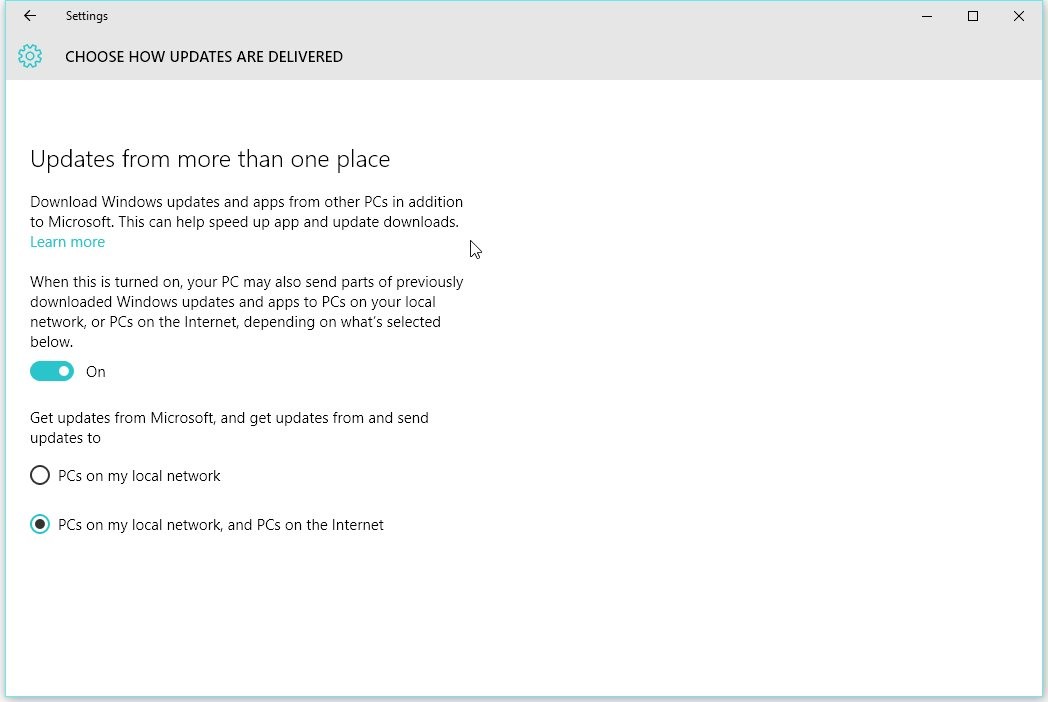
Disable P2P sharing to make sure no process runs in the background to distribute updates to other users in your network or across the web

Disable P2P sharing to make sure no process runs in the background to distribute updates to other users in your network or across the web

Method 3

Additionally, it appears that, in some cases, the notification system is at fault for the high CPU usage, and some users recommend disabling the Windows 10 tips from the very beginning to avoid this.

To do this, go to Settings > System > Notifications & Actions and simply uncheck the box that says “Show me tips about Windows.” If you’re already familiar with Windows 10, you should have no problem at all.
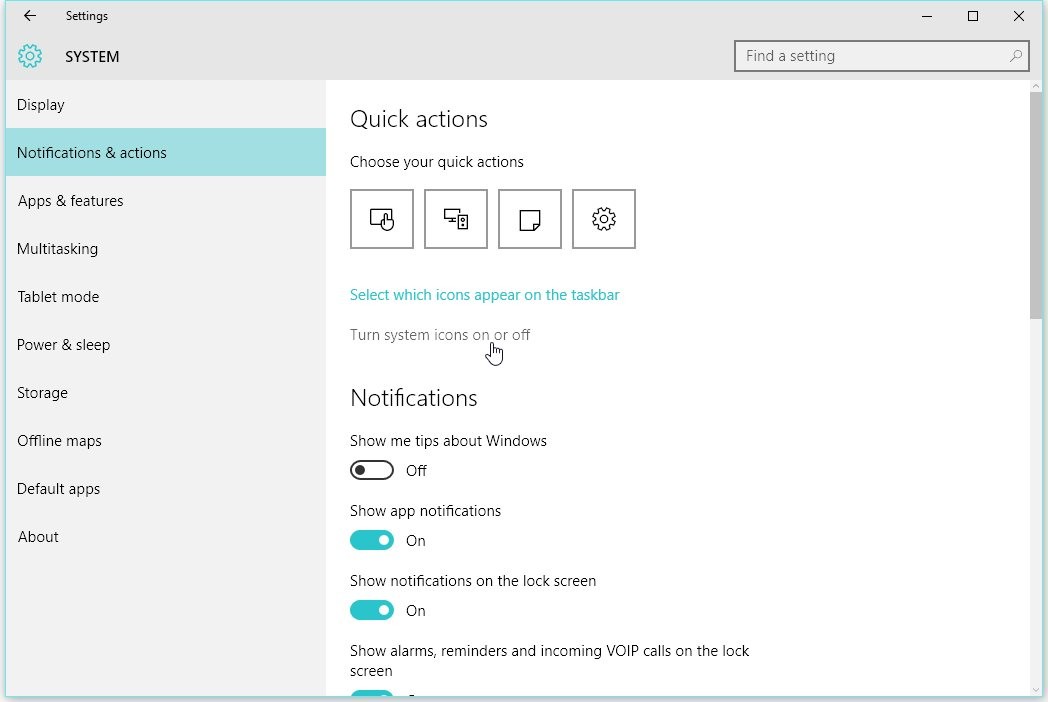
Disabling Windows 10 Tips could help too

Disabling Windows 10 Tips could help too

Method 4

If your Windows 10 version already has support for Windows Spotlight, there are some recommendations to disable it. Once again, background services are believed to be at fault for what’s happening with the CPU, so the high usage could be the result of the services running in the background.

To do this, go to Settings > Personalization > Lock Screen and change Windows Spotlight to Picture.
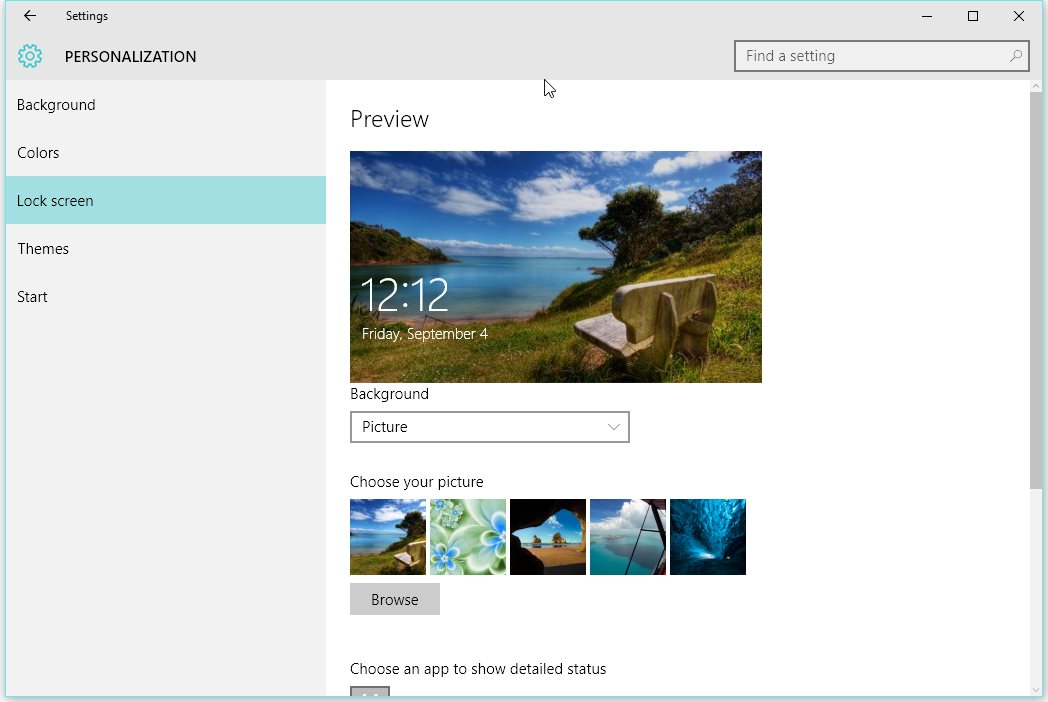
If you have Windows Spotlight, just switch to Picture to avoid the problem

If you have Windows Spotlight, just switch to Picture to avoid the problem

Other methods

There are several other recommendations in this Microsoft Community thread, including the removal of some apps such as OneDrive, Google Drive, external drives, and Groove Music. You can also try disable background apps, as one of these processes might not be optimized for running on Windows 10.

Last but not least, you can try a full Windows 10 refresh, which will reinstall the OS, but without removing your files, settings, and apps. This should work eventually, but it obviously takes more time.

Terbaru

  • Inilah Alasan Kenapa Sinkhole Sering Muncul di Indonesia dan Cara Mengenali Tanda-Tandanya Supaya Kalian Tetap Aman
  • Inilah Program PJJ 2026 untuk Anak Tidak Sekolah, Cara Mudah Masuk SMA Tanpa Harus ke Kelas Tiap Hari!
  • Inilah Program SPMB 2026 PJJ Khusus Anak Tidak Sekolah, Solusi Buat yang Pengen Balik Belajar!
  • Inilah Cara Kuliah di Al-Azhar Mesir Lewat Jalur Kemenag 2026, Lengkap dengan Syarat dan Jadwalnya!
  • Inilah Jadwal Lengkap Jalur Mandiri Unud 2026, Persiapkan Diri Kalian Sebelum Menyesal!
  • Inilah 8 Universitas Swasta Terbaik di Indonesia Versi THE Asia University Rankings 2026 yang Bisa Jadi Pilihan Kuliah Kamu
  • Inilah Jadwal Terbaru SSU ITB 2026 yang Diperpanjang, Lengkap dengan Syarat dan Rincian Biayanya!
  • Inilah 10 Jurusan Kuliah Paling Dicari Perusahaan Tahun 2026, Cek Daftarnya Biar Nggak Salah Pilih!
  • Inilah Cara Daftar Beasiswa Tut Wuri Handayani 2026, Kesempatan Emas Buat PNS Kemendiktisaintek Tingkatkan Karier!
  • Inilah Ketentuan Lengkap TKA Susulan 2026 SD dan SMP, Cek Syarat dan Jadwal Resminya Di Sini!
  • Inilah Kurikulum Berbasis Cinta Madrasah: Panduan Lengkap dan Link Download PDF Terbaru 2026
  • Inilah Kronologi Mencekam Kecelakaan KA Argo Bromo Anggrek Tabrak KRL di Bekasi Timur yang Bikin Jalur Kereta Lumpuh Total
  • Inilah Alasan Kenapa Hari Libur dan Tanggal Penting Selalu Ditulis Pakai Warna Merah di Kalender
  • Inilah Cara Daftar Jalur Prestasi Politeknik PU Semarang 2026, Kesempatan Kuliah di Kampus Kementerian PU!
  • Inilah Cara Cek Bansos PKH dan BPNT 2026 Lewat HP, Lengkap dengan Jadwal Cair dan Besaran Dananya!
  • Inilah Alasan Kemdiktisaintek Bakal Tutup Banyak Jurusan Kuliah yang Nggak Relevan dengan Industri
  • Inilah Status Libur Hari Pendidikan Nasional 2026 dan Sejarah Penting di Baliknya
  • Inilah Daftar Libur Mei 2026 yang Bikin Full Senyum, Siapkan Rencana Liburan Kalian Sekarang!
  • Inilah Daftar Universitas Terbaik di Jepang Versi THE Asia University Rankings 2026, Kampus Mana yang Jadi Incaran Kalian?
  • Inilah Alasan Kenapa Kemdiktisaintek Bakal Tutup Sejumlah Prodi dan Fokus ke 8 Industri Strategis
  • Inilah Sosok Richard Aldrich McCurdy, Penguasa Asuransi yang Terjerat Skandal di Masa Gilded Age
  • Inilah Alasan Suhu Bumi Naik Drastis dan Cara Kita Menghadapi Ancaman Cuaca Ekstrem
  • Apa itu Pasukan Perdamaian PBB?
  • Inilah 25 Universitas Paling Internasional di Dunia 2026, Ternyata Kampus di Asia Mulai Merajai!
  • Inilah 10 PTS Terbaik di Indonesia Versi Webometrics 2026 yang Bisa Jadi Referensi Kalian
  • Inilah Cara Daftar Kuliah di Universitas Al-Azhar Mesir 2026 Lewat Jalur Resmi Kemenag
  • Inilah Daftar 20 PTN Terbaik Indonesia Versi Webometrics 2026, Kampus Impian Kalian Ada Nggak?
  • Inilah Profil Donny Sucahya, Sosok Pengusaha Muda yang Viral Karena Bisnis dan Pernikahannya
  • Inilah Alasan Kenapa Belalang Daun Bisa Berubah Warna dari Pink ke Hijau, Ternyata Mirip Daun!
  • Inilah Kenapa eBay Error dan Mengenal The Hacktivist Group 313 yang Mengklaim Bertanggung Jawab Atas Gangguan Global Tersebut
  • How to Level Up Your PC Gaming Experience with the New Valve Steam Controller and Its Advanced Features
  • Is it Time to Replace Nano? Discover Fresh, the Terminal Text Editor You Actually Want to Use
  • How to Design a Services Like Google Ads
  • How to Fix 0x800ccc0b Outlook Error: Step-by-Step Guide for Beginners
  • How to Fix NVIDIA App Error on Windows 11: Simple Guide
  • How to create high-quality cinematic AI videos and realistic avatars using HeyGen and the Seedance 2.0 model
  • How to build an AI chatbot for your business in just minutes without writing a single line of code
  • How to Master Answer Engine Optimization with HubSpot AEO Tool
  • How to Use GPT-5.5 and Claude Opus 4.7 Together to Maximize Your Workflow Productivity and Code Quality
  • Claude Tutorial: How to Build Your First SaaS Business Using AI Without Coding
  • Apa itu Spear-Phishing via npm? Ini Pengertian dan Cara Kerjanya yang Makin Licin
  • Apa Itu Predator Spyware? Ini Pengertian dan Kontroversi Penghapusan Sanksinya
  • Mengenal Apa itu TONESHELL: Backdoor Berbahaya dari Kelompok Mustang Panda
  • Siapa itu Kelompok Hacker Silver Fox?
  • Apa itu CVE-2025-52691 SmarterMail? Celah Keamanan Paling Berbahaya Tahun 2025

©2026 emka.web.id | Design: Newspaperly WordPress Theme