Microsoft recently updated its critically acclaimed Office suite to a new version. It’s already packed with a staggering amount of features and components, and it would take way too much time just to name them. Now, emphasis is put on collaboration.
Microsoft’s product isn’t the only suite on the market that packs all objects on your desk into a fully-functional computer application. Throughout the years and with the evolution of different technologies, we came in contact with others that want, and deserve a slice of the office cake.
However, Office is not a free product, and not everyone is willing to spend even a dime with all the free alternatives at a mouse click away. As such, we’re going to go through a few features that make an application worthy of transforming a whole office building into several megabytes of data on your computer.
We’re going to take common components and see how well they perform and how practical can be. As such, we present the candidates: Microsoft Office, LibreOffice, and SoftMaker FreeOffice.
The Text editor
Probably the most common component in an office suite is the text editor. Word the is Microsoft Office component, Writer is found in LibreOffice, while TextMaker belongs to SoftMaker FreeOffice.
First of all, you don’t want to risk getting stuck waiting for the application to respond because of who knows what. Stability is an important aspect, and so is backup.
To test this out, we created a text document under specific formats, like DOCX, ODT, and TMD, while pasting the same amount of text in each. Then, we used a small utility called Catfood Font Randomizer to literally randomize the case, font, and size of each character in a large text file.
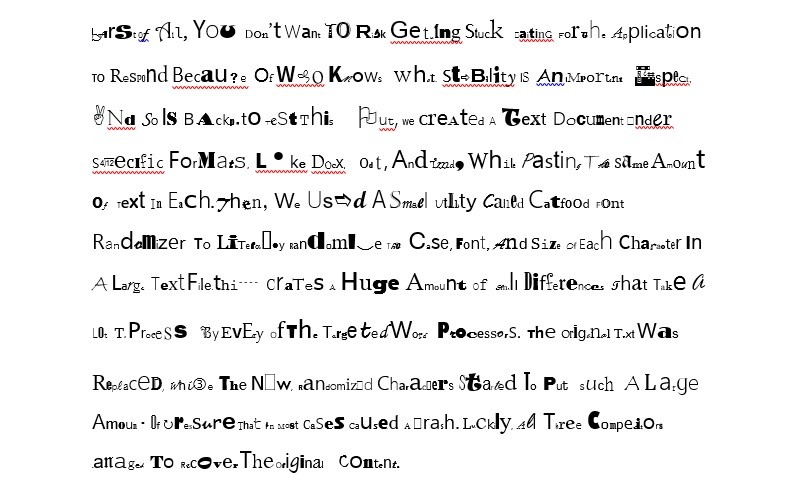
This creates a huge amount of small differences that take a lot to process by every of the targeted word processors. The original text was replaced, while the new, randomized characters started to put such a large amount of pressure that in most cases caused a crash. Luckily, all three competitors managed to recover the original content.
| Microsoft Word |
|---|
| LibreOffice Writer |
|---|
| SoftMaker TextMaker |
|---|
Note: Just because this situation was successful, doesn’t mean you’re able to fully recover after every kind of crash or other accidents.
File support is yet another important characteristic of a text editor, especially since Word is a popular editor that adapted its format over the years, and competitors use it as reference. As such, here’s what each editor is capable of loading and saving. Moreover, all of them can export PDF.
| TextMaker | TMD, TMV, DOC, DOT, DOCX, DOCM, DOTX, DOTM, SXW, ODT, OTT, RTF, PSW, PWD, HTM, HTML, TXT |
|---|---|
| Writer | OTH, ODT, OTT, SXW, STW, FODT, XML, DOCX, DOCM, DOTX, DOTM, DOC, DOT, WPS, HWP, HTML, HTM, LWP, RTF, TXT, WPD, ODM |
| Word | DOCX, DOCM, DOTX, DOTM, DOC, DOT, HTM, HTML, RTF, MHT, MHTML, XML, ODT, PDF |
Whenever you’re in a hurry to create or edit a specific document, print it out, and present it in front of important people, you want to make sure everything’s spelled correctly. While all three candidates are fitted with spell-checking features, TextMaker leaves a bit more to be desired, and even Word might get stuck in certain situations.
| Microsoft Word |
|---|
| LibreOffice Writer |
|---|
| SoftMaker TextMaker |
|---|
The Slideshow maker
Office isn’t just about writing piles of text that get read once, and are left forgotten somewhere in a virtual space. Presentations have an important saying, and can make half the impression when you need to convince a large public your argument is valid.
This is the component where creativity is the center of attention. You’ll be happy to know that all three candidates, Microsoft Office’s PowerPoint, SoftMaker Presentations, as well as LibreOffice Impress, are capable of creating slides limited only by your imagination.
Trying out a few tricks here and there, we conclude that PowerPoint takes the lead. This isn’t only because of the familiar design that makes elements easy to identify and use, but also the abundance of preset designs, font styles, and even the animation timeline editor that makes it possible to perfectly time each motion.
| Microsoft PowerPoint |
|---|
| SoftMaker Presentations |
|---|
| LibreOffice Impress |
|---|
The Spreadsheet creator
Tables are used to hold data in an organized manner, with the extended possibility to bundle it up in different charts for better visualization. This is where things not only get complicated, but also complex, because creating a spreadsheet isn’t all about writing values in different cells, but you also need functions for different automated operations that would normally take a lot of your time.
Microsoft Office lets you work with Excel, LibreOffice puts Calc at your disposal, while SoftMaker handles this task with PlanMaker. Even if you’re able to perform the majority of data input in multiple sheets, and build different charts with all candidates, this also needs to be done without spending too much time looking for functions and features of interest. Again, it narrows down accommodation, with PlanMaker falling behind.
| Microsoft Excel |
|---|
| LibreOffice Calc |
|---|
| SoftMaker PlanMaker |
|---|
In conclusion
All in all, this wasn’t really a competition, so we’re not going to call any of the presented Office suites a winner. The purpose was merely to point that fame doesn’t really make a product the best out there. What does in fact count is the type of data you have at your disposal, the public you’re addressing to, as well as the destination, because all of them are capable of meeting demands, but each in its own way.