
I have been using Linux Mint on my secondary workstation for years because it is the only distro that does not try to reinvent the wheel every six months. It is the comfortable pair of jeans of the Linux world. But with the announcement of Linux Mint 27 “Adrien” hitting beta, the team is shaking things up in a way that feels uncharacteristically bold.
First, let us talk about the elephant in the room: the version number. Jumping from 22.3 straight to 27 feels like a glitch in the matrix, but it is actually a move toward a calendar-based naming scheme. It is a bit of a psychological trick, making the OS feel more “current” against Ubuntu and Fedora. Under the hood, this is built on the Ubuntu 26.04 LTS foundation and powered by the Linux kernel 7.0. It is a heavy hitter.
The Wayland Milestone
The most significant change for me is the status of Wayland. For the longest time, the Cinnamon Wayland session was tucked away with an “experimental” warning that basically meant “use at your own risk if you value your sanity.” In Linux Mint 27, that tag is gone. The team has spent months fixing window positioning and HiDPI rendering.
I tested the touchpad gestures on the beta build, and the one-to-one mapping is finally here. If you move your fingers, the animations follow. It feels organic, almost like macOS, which is a high bar for a desktop environment often labeled as “traditional.” That said, I appreciate that Clem and the team kept X11 as the default. They know their audience. Most Mint users just want their PC to work when they turn it on, and Wayland, while much better, still has its quirks with certain Nvidia setups.
A New Suite of “XApps”
Mint has always been obsessed with “homegrown” apps, and Adrien doubles down on this. We are getting a bunch of new tools under the XApp project. Some feel necessary, others feel like the team just wanted to see if they could do it.
Superlight, the new system monitor, is a standout. The old GNOME-based system monitor was getting long in the tooth, and this new one gives you a much cleaner breakdown of GPU and network activity. Then there is Clockenstein, which is a bizarre name for a calendar and alarm app, but it works well with Google Calendar and Nextcloud right out of the gate.
I am a bit skeptical about “Velocitty,” the new terminal emulator. Do we really need another terminal? Probably not. But having saved SSH sessions built into the UI is a nice touch for those of us who spend half our lives remoted into servers.
The Installer and the Hibernation Comeback
One thing that caught me off guard is the new Live Installer. They have ditched Ubuntu’s Ubiquity for the one they developed for the Debian Edition (LMDE). It is faster, but there is a catch: if you are a beginner looking to dual-boot, the current beta does not have the “Install alongside” button. You have to do manual partitioning. I hope they fix this before the Christmas release, or the forums will be flooded with confused newcomers who accidentally wiped their Windows drives.
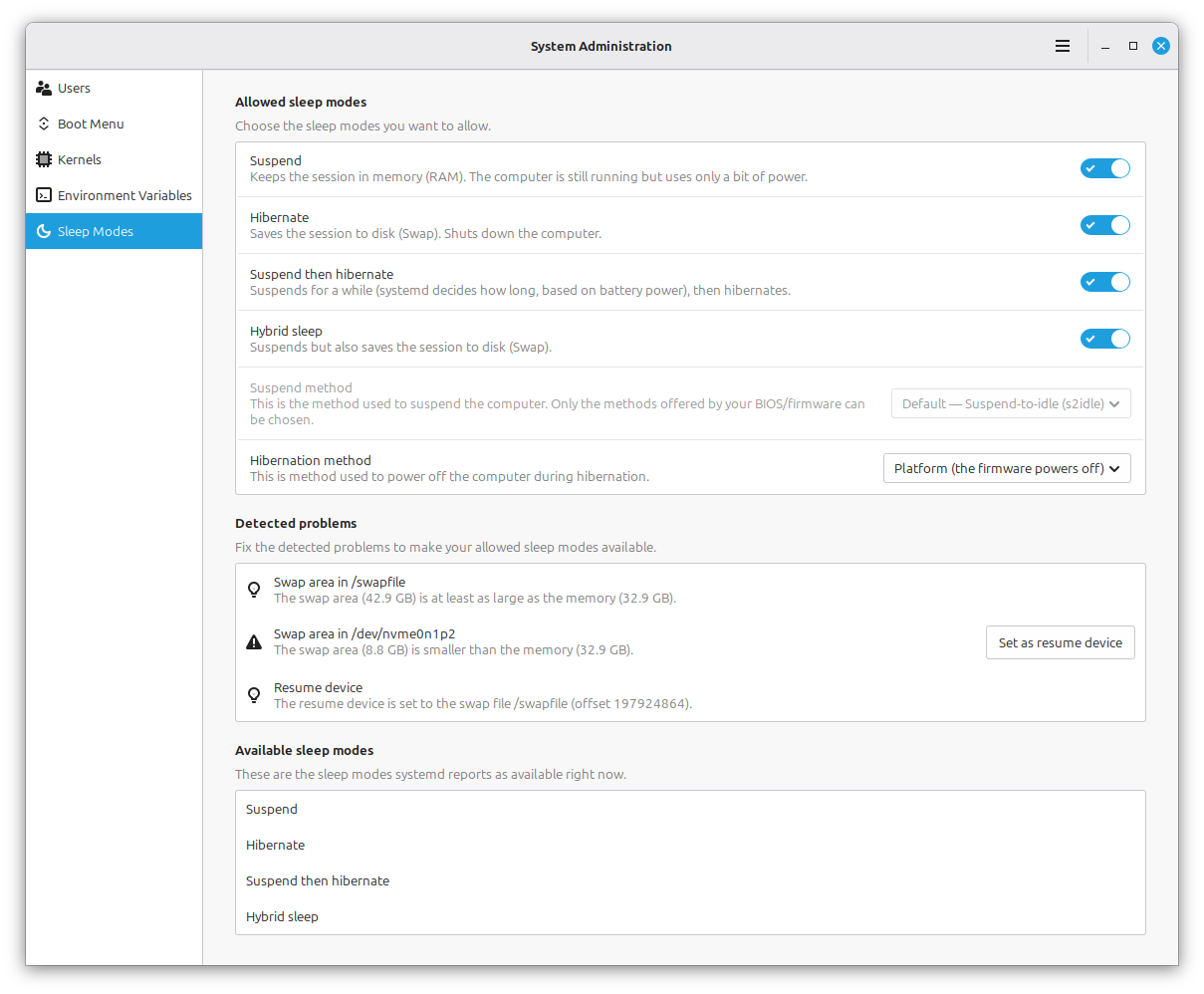
On the plus side, hibernation is back in a big way. The new Sleep Modes section in the System Administration settings is a godsend for laptop users. You can finally toggle hybrid sleep or “suspend-then-hibernate” through a simple GUI without digging through obscure terminal commands or editing systemd files. It is these small, “boring” quality-of-life fixes that keep people loyal to Mint.
Final Thoughts on the Beta
Linux Mint 27 feels like a transition. It is moving away from being just “Ubuntu with a better skin” and toward becoming its own fully independent ecosystem. The shift to a yearly release cycle is a smart move to keep the momentum going without the confusion of point releases.
If you are a tinkerer, the beta is worth a spin just to see how smooth the new Nemo preview pane (F7) is. But if this is your primary machine, wait for the stable release around Christmas. The lack of automatic partitioning in the installer is a red flag for casual users, but for the rest of us, Adrien looks like the most refined version of Mint we have seen in years.