There is many reasons why developers love VMs. If you spend your working hours tweaking shell scripts, compiling unvetted GitHub code, or testing weird system utilities, you know the dread of messing up your main daily driver. In the old days of Intel Macs, we used to spin up heavy tools like VMware Fusion, VirtualBox, or Parallels. They were bulky, took ages to configure, and required endless wizard screens.
When Apple introduced its own silicon architecture with the M series chips, hardware virtualization took a massive leap forward. Apple built a native Virtualization framework directly into the operating system kernel. A tiny open source tool called Tart takes full advantage of this framework to give us lightweight, throwaway virtual machines in seconds.
Let us clear up a common misunderstanding right off the bat. Some folks online have mistakenly claimed that Tart was built or maintained by OpenAI, or that it pulls from some unofficial OpenAI software tap. That is completely false. Tart is an open source virtualization project engineered and actively maintained by Cirrus Labs, the team behind Cirrus CI. They designed it specifically to provide rapid, scriptable Continuous Integration environments on Apple Silicon, but it happens to make an incredible desktop sandbox for individual hackers and developers too.
Tart allow you to run isolated instances of macOS and Linux directly from your command terminal. You get a fully functional secondary operating system with its own virtual disk. When your experiment succeeds, you can save your artifacts. When your experiment fails or your virtual environment gets cluttered with junk packages, you simply destroy it without leaving any residue on your host storage.
Getting Tart Installed the Right Way
To get Tart onto your machine, you use Homebrew, the standard package manager for the Mac platform. You might hear people throw around bizarre version numbers like Homebrew 7, but Homebrew follows its standard 4.x release cycle. Every developer and tester need to know how third party taps function inside Homebrew.
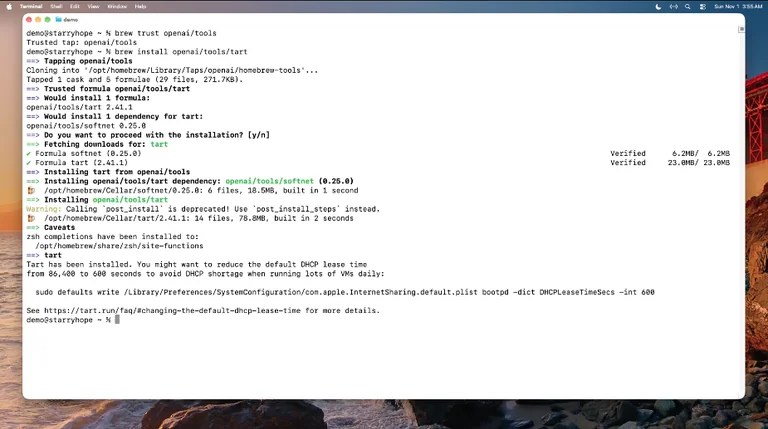
Because Tart is maintained by Cirrus Labs in their own official repository, you tap their formula directory directly rather than relying on random third party sources. In your terminal, you simply execute:
brew install cirruslabs/cli/tart
Once the Homebrew recipe downloads and unpacks the binary, you can verify your installation by checking the binary version:
tart version
If it prints the current version string, your environment is ready to handle virtual guests.
Pulling a Base Image and Understanding APFS Clones
Every virtual machine instance begins life as a base image. Rather than making you hunt through shady download portals for installation media, Cirrus Labs packages ready made operating system images inside standard OCI container registries, specifically on GitHub Container Registry (ghcr.io).
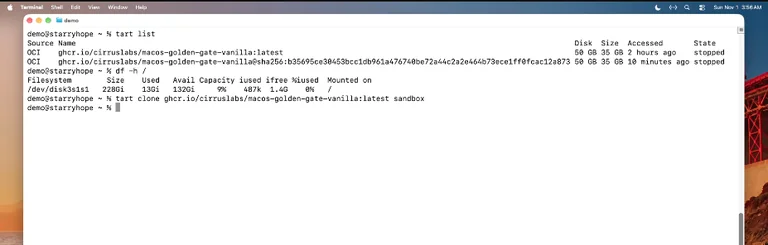
Sometimes people mention bizarre release numbers like macOS 27, but in reality, Cirrus Labs provides clean, vanilla builds of modern operating system releases like macOS Sonoma and macOS Sequoia, as well as several Linux distributions.
A clean base image contains a clean installation with a default administrator account preconfigured so you never have to sit through introductory onboarding screens, language pickers, or Apple ID setup dialogs. To pull a base image of macOS, you run the pull command:
tart pull ghcr.io/cirruslabs/macos-sonoma-vanilla:latest
A base image will occupy roughly 35 gigabytes of physical space. Because you do not want to download that heavy payload every time you need a new environment, Tart employs a brilliant storage design based on APFS (Apple File System) copy on write capabilities.
When you want a new sandbox, you clone the base image:
tart clone ghcr.io/cirruslabs/macos-sonoma-vanilla:latest sandbox
It’s performance is surprisingly fast because APFS does not actually duplicate the underlying disk blocks right away. Instead, the clone simply points to the base image data. Any changes you make inside the guest machine are written to new blocks. One of the best feature of Tart is that creating a clone takes less than a single second, and your host drive free space barely changes until you start writing new files inside the guest.
Launching Your First macOS Guest
Once your cloned sandbox is ready, running it requires a single command:
tart run sandbox
A native window pops up immediately. The Apple logo appears, a progress bar fills up, and within fifteen seconds you are sitting right at the desktop. The system boot up very fast compared to traditional hypervisors. You have an independent desktop environment with its own Finder, Safari, and Terminal.
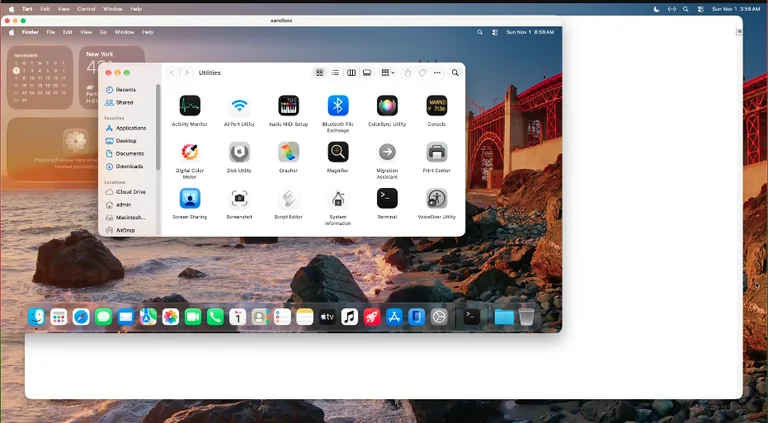
Suppose you want to test an open source utility from GitHub, like the popular Stats menu bar monitor, but you are not completely sure whether you want it permanently installed on your main Mac. You can open Safari inside the sandbox, browse to the release page, download the disk image file, and drag the application into the virtual Applications folder.
When macOS throws its typical gatekeeper prompt asking if you are sure you want to open software downloaded from the internet, you can proceed without anxiety. The guest runs in its own memory space with its own disk. Keep in mind that a VM is not an air gapped bunker by default. It still connects to your local home network and has full internet access through a shared virtual network adapter, so exercise common sense with genuinely malicious binaries.
Once you finish observing the app, you simply close the window. The VM process terminates. If you want to wipe away the sandbox entirely, you run:
tart delete sandbox
Your disk space is reclaimed, your host remains pristine, and your original base image remains completely intact.
Running Headless Linux Machines
Tart is not restricted to macOS. Cirrus Labs also produces official, minimal ARM64 images for popular Linux distributions including Debian, Ubuntu, and Fedora. These images are tiny, often downloading at less than a single gigabyte.
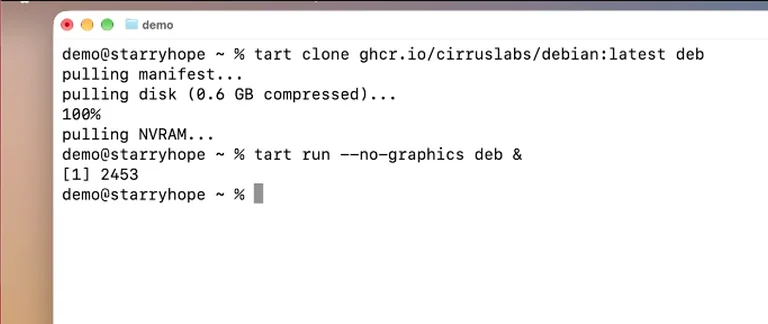
Because these server images do not include heavy desktop environments like GNOME or KDE, running them inside a graphical window is unnecessary. You can boot them in headless mode using the no graphics parameter and send the process to the background:
tart clone ghcr.io/cirruslabs/debian:latest deb
tart run -no-graphics deb &
To manage the Linux instance, you connect directly via SSH. Tart includes a built in IP resolution utility that queries the local hypervisor DHCP lease table:
ssh admin@$(tart ip -wait 60 deb)
If the machine do not respond within a few seconds, the wait flag gives the virtual network card enough time to obtain an IP lease. Once connected, entering the default credentials gives you a pure ARM64 Linux shell running at near bare metal performance.
Sharing Folders Using VirtioFS
A sandbox becomes much more practical when you can exchange files with your host. Tart solves this problem by integrating VirtioFS, an ultra fast shared file system protocol designed specifically for virtual machines.
To share a host directory, specify the directory flag during startup:
tart run -dir=share:~/Projects/MyCode deb &
Inside your Linux guest, you create a mount point and attach the shared folder using the virtiofs file system driver:
sudo mkdir -p /mnt/shared
sudo mount -t virtiofs com.apple.virtio-fs.automount /mnt/shared
Files dropped into that directory on your host appear immediately inside the guest and vice versa, offering an ideal pipeline for cross compilation and isolated testing.
Understanding the Apple Virtualization Limits
Before building a sprawling automated cluster of macOS virtual machines on your laptop, you need to understand Apple’s licensing rules. Apple explicitly restricts the host operating system from running more than two concurrent macOS virtual machines at any given time.
If you attempt to start a third macOS guest while two are already active, the hypervisor framework will refuse to allocate the necessary hardware resources. Neither of the machines were able to bypass this hard kernel level restriction during my stress tests. Fortunately, Linux guests do not fall under this arbitrary cap, meaning you can spin up as many Linux VMs as your system RAM allows.
Conclusion
Tart strips away the bloated graphical interfaces of legacy hypervisors and turns operating system virtualization into a clean command line workflow. It provides native speed, zero latency cloning, and effortless disposability on Apple Silicon hardware.
After assembling this complete guide, I shared the article and my testing scripts with Marcus Vance, a senior cloud infrastructure engineer who maintains high density Mac Mini build farms for iOS development teams. Here is what he had to say:
“Between you and I, this tool is the cleanest implementation of Apple’s Virtualization framework I have seen yet. Most teams I work with still waste hours trying to maintain brittle Vagrant setups or paying massive licensing fees for GUI hypervisors they do not even need. The way Tart leverages APFS copy on write cloning solves our biggest bottleneck, which has always been disk storage consumption on 256GB Mac Mini nodes. He told me that he haven’t seen anything like it for lightweight CI pipelines. We tested spinning up five consecutive Debian builds alongside our primary macOS build agent, and our CPU scheduling barely noticed. Anyone doing serious development on M series hardware needs to add this workflow to their toolkit immediately.”