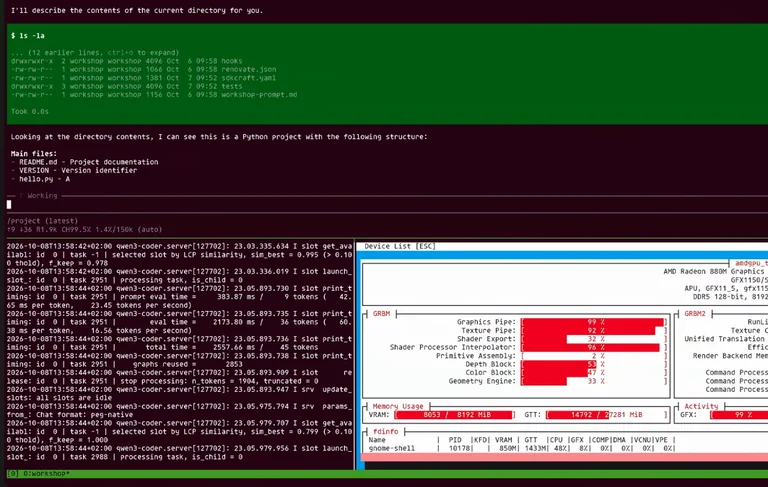
Today, we’re building a fully local agentic coding sandbox on Ubuntu powered by Pi, inference snaps, and Canonical Workshop. This is how the end result looks.
In the center of the terminal I have the Pi coding agent. I can give it a simple prompt like “describe what is in the current directory.” Immediately you see on the bottom right that GPU activity is increasing. On the bottom left you can read the logs of the LLM that I’m serving locally, and in the center you can read the response being generated by the agent. I’m going to interrupt this just to show that all of that happened without any internet access.
You will learn how to recreate this exact setup step by step. Let’s look at the overall architecture.
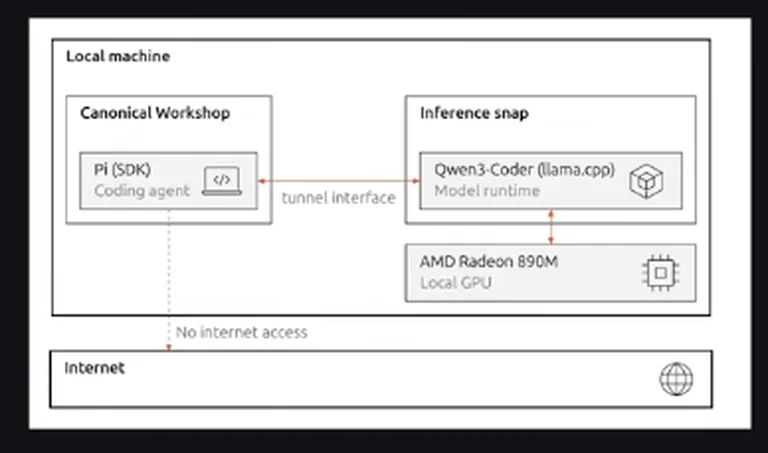
Initially we need internet access so we can download all the necessary components. You can turn it off later if you want. We will run the Pi coding agent inside a Canonical Workshop container so that it is isolated from the host environment. We will use the Qwen 3 Coder inference snap. In my case I’m making full use of my AMD GPU, although a CPU-only setup also works. The coding agent and the inference snap are connected through a tunnel interface so the agent does not need anything else from the host.
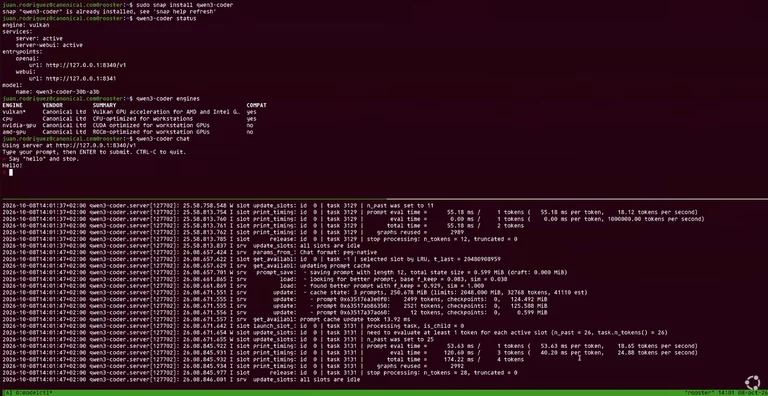
First we install the Qwen 3 Coder snap:
sudo snap install qwen3-coder
In my case it is already installed. In your case you will need to allocate several gigabytes and wait a few minutes while the necessary components and model weights are downloaded.
We can check the status:
qwen3-coder status
You will see the endpoint, that it is active, and which engine is being used.
A quick note about the engines. Running:
qwen3-coder engines
shows several available engines. I’m using a development version of the snap, so I also have a Vulkan engine, which happens to work best with my hardware. You should also see a CPU engine and two GPU engines. Choose the one that works best for your hardware.
We can inspect the logs:
sudo snap logs qwen3-coder
All slots are idle, which means the LLM is ready.
We can also open a simple chat interface:
qwen3-coder chat
Giving it a short prompt such as “say hello” produces roughly 20–25 tokens per second, which is respectable considering the system is under load at the same time.
We can also query the endpoint directly:
curl http://127.0.0.1:8340/v1/models | jq
This shows the model ID that is being served. We will need this value later.
Regarding configuration: because I am running other workloads at the same time, I limited the context size of the model. You can list the available parameters with:
qwen3-coder get
Some parameters belong to the endpoint and others to the model itself. If you change any values, the snap will prompt you to restart.
Now let’s set up Workshop. First install it:
sudo snap install workshop
We also need LXD on the 6/stable channel, because Workshop uses LXD under the hood:
sudo snap install lxd --channel=6/stable
I move into the project I want to work on—in this case a fresh checkout of the Pi Coding Agent SDK. SDKs are the components that get installed inside a Workshop environment.
I create a workshop.yaml definition. The minimal properties are:
name: devbase: ubuntu-26.04
I also declare the Pi SDK. With that definition I can launch the workshop:
workshop launch
Workshop fetches the Pi SDK from the store, starts the LXD containers, and when it finishes we can check the status:
workshop info
The status is “ready” and one SDK has been installed. Entering the environment:
workshop shell
changes the prompt. We now have access to the same files that exist on the host (including the workshop.yaml we just created), but otherwise the environment is isolated.
If we try to launch Pi at this point it will warn that no models are available, because the workshop is isolated from the host. We therefore need a tunnel interface, which is declared with slots and plugs.
In the Pi SDK we declare a plug:
plugs:
  llm-endpoint:
    interface: tunnel
    endpoint: http://localhost:8340
On the system side we declare the corresponding slot (again using the special system SDK):
slots:
  llm-endpoint:
    interface: tunnel
    endpoint: http://localhost:8340
After saving the changes we exit the workshop and refresh it:
workshop refresh
Then we manually connect the tunnel:
workshop connect pi:llm-endpoint system:llm-endpoint
Returning to the workshop shell, the same curl command now succeeds, confirming that networking works:
curl http://127.0.0.1:8340/v1/models
For convenience I also define a simple action in the workshop definition that launches Pi with any extra parameters I supply. After another workshop refresh I can run:
workshop run pi
We still need to tell Pi which model to use. Inside the workshop I edit ~/.pi/agents/agent/models.json and add a provider for the Qwen 3 Coder snap:
base_url:http://localhost:8340/v1api:openaiapi_key: any placeholder value (it is required but unused)models: a list containing the exact model ID returned earlier, plus any customizations (for example"context_window": 150000)
With the configuration complete I can start Pi. Asking it to “describe what is in this repository” causes the LLM logs to start moving and Pi begins streaming the response while calling tools. GPU activity on the AMD card increases accordingly.
That is how you build a private, fully local agentic coding sandbox on Ubuntu. All the configuration files, including the workshop definition and the models.json, are linked below.
Source: Ubuntu Youtube Channel