
Vinix OS is brand new OS written in V language (yes, you right, there is a programming language with letter V!). This Vinix OS is boots in seconds, 50 MB of RAM, runs on Apple Silicon, talks to Alpine packages like they belong there. It sounded almost too clean to be real. Alpha software, they keep saying, not for daily use. Still, curiosity won. I cloned the repo and decided to see what actually happened.
Getting it on the screen
I’m on an M1 Mac, so the path was the aarch64 one. Homebrew already had most of what I needed, but QEMU was missing.
brew install qemu
git clone https://github.com/vlang/vinix
cd vinix
./run-desktop-aarch64.sh
The first run took a while because it had to build things. I almost closed the terminal thinking it had hung. It hadn’t. Eventually a QEMU window appeared and the desktop came up. No long boot messages, no waiting for services. Just… there. The claimed 50 MB felt plausible; Activity Monitor on the host barely noticed.
One small annoyance: mouse input felt a little laggy the first time, probably the virtio path. I restarted the script once and it smoothed out. Also, the persistent disk setup needs a bit of attention if you want files to survive reboots — the default is mostly RAM-backed until you point it at an ext2 volume. I forgot that the first time and lost a couple of notes. Mild frustration, then I fixed it and moved on.
On a regular Linux machine the amd64 launcher does the same job with KVM when it’s available. The scripts are straightforward once you accept that this is still early.
Looking around for the first time
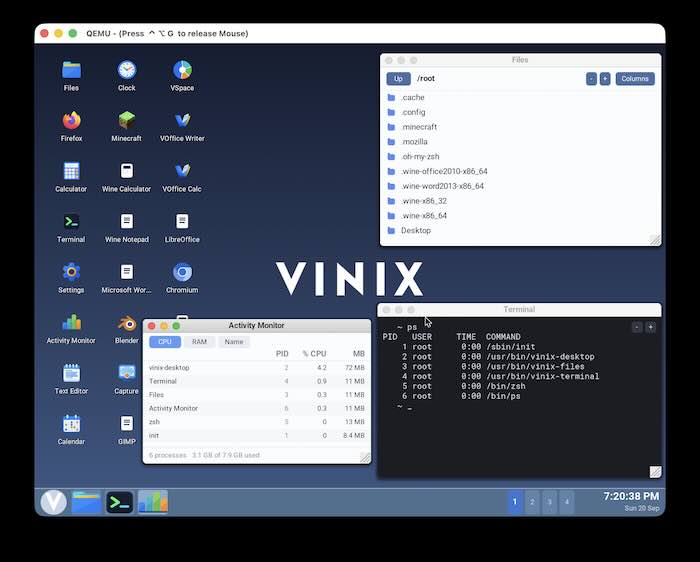
The desktop is written from scratch in V and V UI2. No X server underneath the default session, no display server in the usual sense — it draws straight to the framebuffer and composites its own windows. That shows. Windows feel immediate. There’s a file browser, a terminal, a simple activity monitor. Themes exist; I tried one that vaguely reminded me of an older macOS and one that looked closer to something Windows-ish. Both worked without drama.
Core ideas hit you pretty quickly. No garbage collector in the kernel. Manual memory management. No systemd. Nothing running that you didn’t start. The whole thing is meant to stay small across releases. Package management is pkg — it pulls from Alpine’s aarch64 repositories. So pkg install feels familiar if you’ve ever used Alpine, and a surprising number of binaries just work: Chromium, Sublime Text, Gnumeric, even Wine for some Windows stuff. Docker is there too. The kernel implements enough of the Linux syscall surface that those Alpine packages land and run without a VM or translation layer in the common path.
Other things I tried
I installed Chromium and opened a couple of pages. It worked. Sublime Text felt responsive. I briefly played with Wine and got the calculator and notepad up; that still feels like a party trick more than a daily path. Docker pulled and ran a small Alpine container. The optional per-app sandboxing is there but off by default — I didn’t dig deep into it, but the idea of giving a browser its own private directory makes sense for the threat model they’re thinking about.
The GPU work for Apple Silicon is still in progress. Software rendering is fine for what I was doing, but you can feel the ceiling. Wayland/Hyprland is available as an alternative session; I tried it once and it was usable, though the native V desktop is clearly the intended path.
Some corners still feel half-baked. Networking can be quirky depending on how you launched QEMU. A few Alpine packages that assume more complete Linux kernel features just fail. Documentation is honest about the alpha status, which I appreciate, but you still end up reading source or Discord for the finer points.
Where I landed
What I liked most is the feeling of a system that stays out of the way. Low memory, fast boot, no background noise, and a kernel small enough that the idea of reading it doesn’t feel absurd. The Alpine compatibility is the practical miracle — it turns “from-scratch OS” into something you can actually install real software on without waiting years for ports. Building the little plant tracker felt ordinary in the best way: the tools were there, the environment didn’t fight me, and the whole thing stayed light.
What still feels limited is exactly what they say on the site. It’s alpha. GPU acceleration is incomplete. Hardware support outside the current Apple Silicon focus and QEMU is thin. Some Linux assumptions still break. You wouldn’t hand this to someone who just wants a daily driver tomorrow.
Next I might try the real-hardware M1 installer path, or keep extending the plant tracker into something that survives reboots cleanly and maybe adds a simple chart. Or just rebuild the kernel a few times for the fun of watching V compile it in seconds. For now it sits as one of the more interesting late-night experiments I’ve done in a while — an OS that feels like it was built by people who actually care about the machine staying fast and quiet.
It stuck, hahaha!