On this article, we’re looking at the five new apps in Omarchy 4.5. This is a preview of the first release candidate, so some details may change before the final release. All five come installed in the release candidate with nothing extra to add.
We’ll start with Hype for slides, followed by Signed for filling out and signing PDF forms. Then come Disk Tree for disk space, Monolog for recording yourself on camera, and Glyph for another computer’s desktop over SSH.
1. Hype
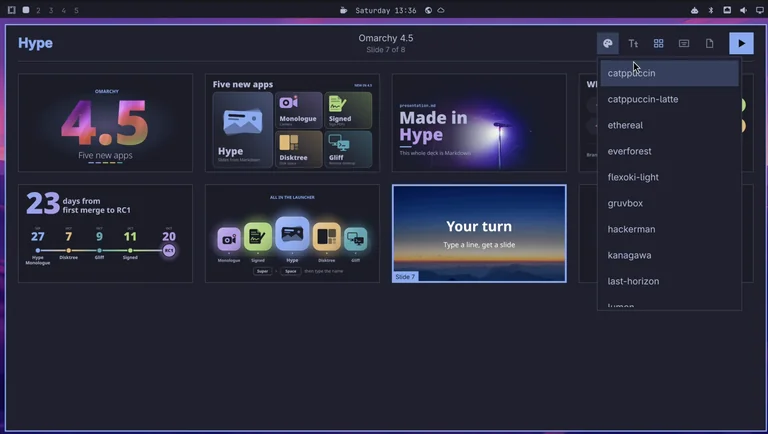
A presentation app where the whole deck is one plain text file written in Markdown.
Super Space opens the Omarchy menu, and typing a name finds the app. Super is the Windows key on a PC keyboard.
Hype opens on the last deck we worked on. Its drawings are SVG, a text format for pictures, so the editor under the first slide shows code. The overview lays out every slide of the deck. Each slide is text in the editor below with a live preview above it.
In Markdown, a pound sign (#) in front of a line makes a headline. On a new slide, we type a headline and a line. The preview follows every keystroke. The media button adds a photo, and it fills the slide behind the text. Hype saves the deck file with every edit.
A deck also has its own theme picked from the same list as your system theme. Ours starts on the Tokyo Night theme. From the theme menu, we switch the deck to the Cappuccino theme. The drawings change color at once because they use the theme’s colors.
To present, Shift + F5 fills the screen from the first slide, and the arrow keys step through. The slides keep the Cappuccino colors we picked. The slide we typed shows full screen, too, with the photo behind its headline.
To share the deck, Hype exports it as a PDF or a PowerPoint file.
2. Signed
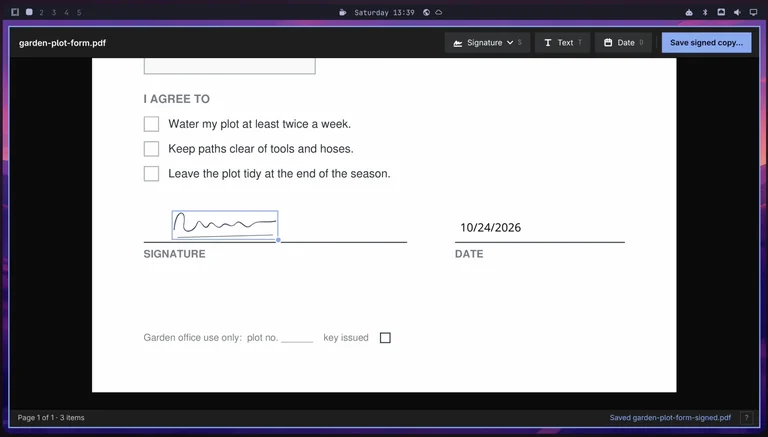
Signed is for filling out and signing PDF forms.
On our form, we fill in a name, a signature, and a date. For the name, T places a text box wherever the pointer is. Lower on the page, D puts today’s date at the pointer, so there’s no date to type. The text is placed over the form, not typed into its fields.
The signature starts as a photo of ink on white paper. In the Add Signature dialog, Signed cuts the ink out of the paper. The paper threshold slider sets how much of the paper is cut away. Signed keeps the signature ready for the next form.
Once the signature is on its line, Save Signed Copy writes a new PDF beside the original. The status bar shows the new file name, ending in “Signed”.
3. Disk Tree
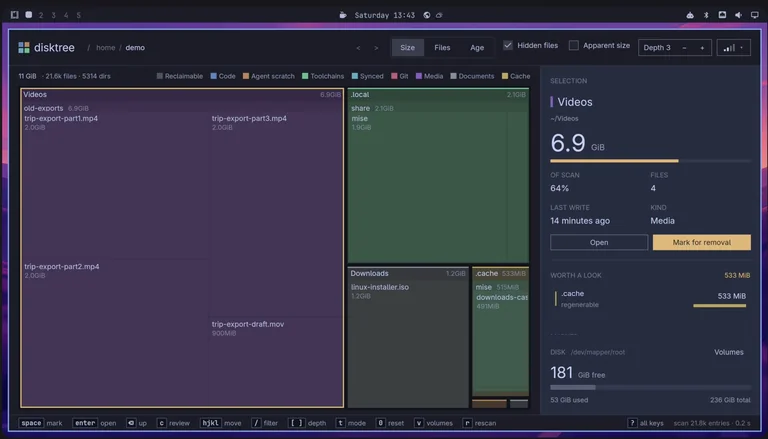
Disk Tree draws your home folder as colored blocks, and a bigger block uses more space. The colors mark the kind of file, such as media, code, or cache.
Our home folder scans in under a second. The biggest block here is a folder of old video exports, almost 7 GB. Mark for removal turns the folder’s blocks red. The panel then shows the free space we’d have after removing the folder.
Nothing is removed until a review screen lists the marked folder. The choices are Move to Trash (the default) or Delete Permanently. Move to Trash keeps the folder recoverable. We move the folder to the trash. After the rescan, the trash is the biggest block. Disk space is freed only when you empty the trash.
4. Monolog
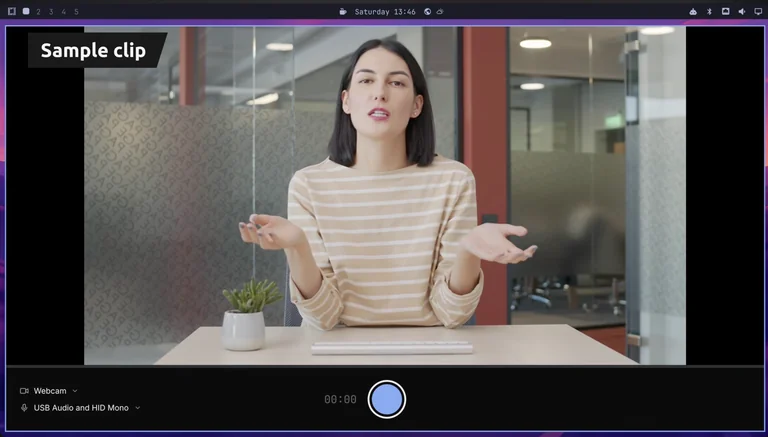
Monolog records you on your webcam with an editor for cutting out the parts you don’t want. The camera feed here is a sample video clip standing in for a real webcam.
Monolog remembers the camera and microphone you pick in the menus at the bottom left. Recording starts with Space, so you don’t need the mouse while you’re on camera. The same key pauses the recording when you need a moment. One more press resumes it, and the new part joins the same recording. Enter stops the recording and opens the editor.
The editor shows the whole recording as a film strip under the picture. A white dot on the film strip marks the spot where we paused. When you trim or split the recording, the edit snaps to that dot, so you can cut right at the pause.
A double-click on the film strip splits the recording into two clips, each with its own trim handles. Dragging the start handle to the right trims about 3 seconds off the beginning. The trimmed part only dims because the full recording is kept until you quit or record again. Save writes a new MP4 without the dimmed part.
By default, Monolog saves the MP4 in your Videos folder, named with the date and time.
5. Gliff
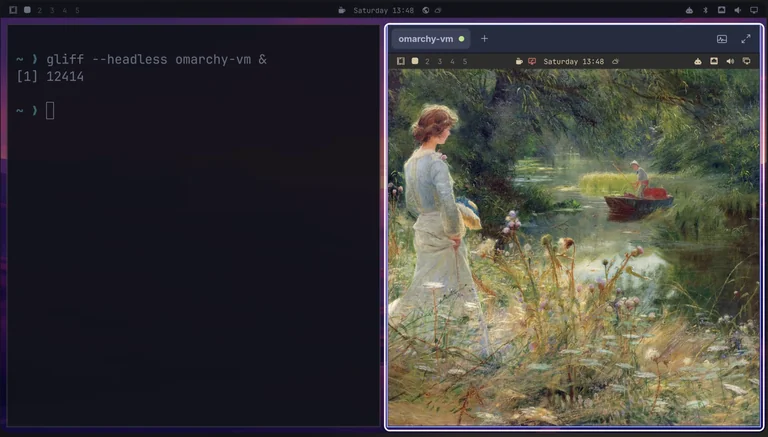
Gliff shows another computer’s desktop in a window over SSH. SSH is the usual secure way to sign in to another computer. Both computers need Hyprland, the window manager Omarchy runs on.
From a terminal, one command opens a private screen on the other computer. It’s an extra display that only Gliff shows, sized to fit the window. The other computer uses the Gruvbox theme, so the two are easy to tell apart.
While we’re connected, the other computer’s top bar shows a red remote session icon. With the pointer over the picture, every key reaches the other computer, shortcuts included. Super + Enter opens a terminal over there, not on our side. In that terminal, a short command prints the version installed there — the same release candidate as ours.
The clipboard is shared between the two computers. Text copied over there pastes straight into our own terminal. Text copied on our side pastes over there, too. Each computer you connect to gets its own tab in the title bar. Disconnecting also removes the private screen over there.
Conclusion
Two of the five apps replace older tools:
- Signed replaces the Xournal++ app for PDFs
- Disk Tree replaces the Disk Usage terminal tool
Hype, Monolog, and Glyph are brand new.
On your own computer, the release candidate is a channel in the Super Space menu under Update → Channel. Picking RC (short for Release Candidate) switches your packages and runs the full update. The Omarchy developers say to expect bugs and some things may break outright. They suggest a spare machine or a backup you can restore.