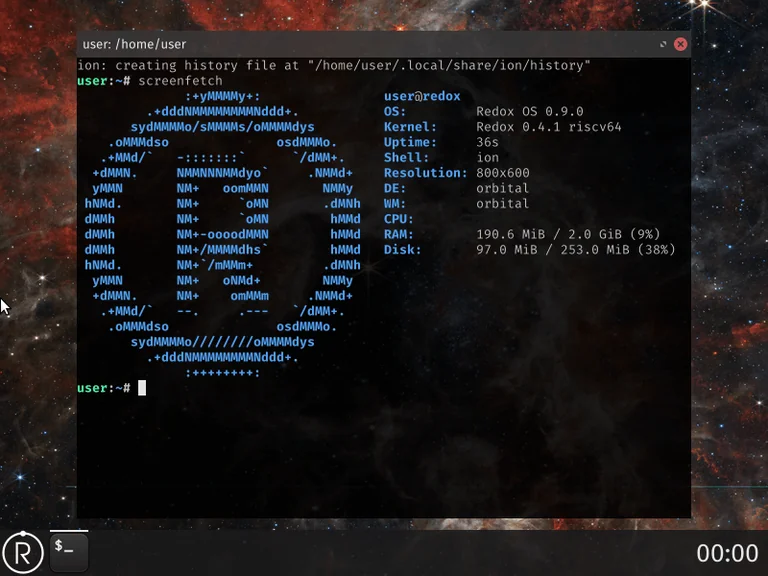
Redox OS is one of the more ambitious operating system projects currently under active development. It is a complete Unix-like system written primarily in Rust, built around a microkernel design, and aimed at becoming a practical alternative to Linux and BSD. As of version 0.9.0, it remains in an alpha stage, but it already offers a working desktop environment, a growing set of applications, and a clear architectural philosophy.
This article explains what Redox OS is, how it differs from Linux, and the practical ways you can try or install it today.
What Is Redox OS?
Redox is a from-scratch operating system. It is not a Linux distribution and does not use the Linux kernel. Instead, it has its own microkernel written in Rust, along with drivers, system services, and a userspace that are also largely written in Rust.
Key design goals include:
- Security and reliability through a small kernel and memory-safe language
- Source compatibility with many Unix/Linux programs
- A complete system that can eventually serve as a general-purpose desktop and server OS
The project has been under development since 2015 and is released under the MIT license. It supports x86-64, with work ongoing for ARM64 and RISC-V.
Major Differences Between Redox OS and Linux
The differences go deeper than the programming language.
1. Kernel Architecture
Linux uses a monolithic kernel. Most drivers and many system services run inside the kernel address space. This design offers high performance but means a bug in a driver can crash or compromise the entire system.
Redox uses a microkernel. The kernel itself is kept deliberately small. Drivers and many system services run in userspace. Communication happens through a mechanism called “schemes.” This reduces the attack surface and improves isolation, at the cost of some overhead compared with a well-tuned monolithic kernel.
2. Language and Safety
Linux is written mainly in C (with increasing amounts of Rust in recent years). Redox’s kernel, drivers, and large parts of userspace are written in Rust. Rust’s ownership model and borrow checker eliminate entire classes of memory safety bugs at compile time. This is one of the project’s strongest selling points.
3. Compatibility Model
Linux runs Linux binaries natively. Redox aims for source compatibility. Many programs can be recompiled for Redox with little or no modification thanks to a custom C library (relibc) and POSIX-like interfaces. It does not currently offer a full binary compatibility layer for existing Linux executables the way some other systems attempt.
4. Filesystem and System Design
Redox uses RedoxFS, a filesystem inspired by ZFS. The system also draws inspiration from Plan 9 in the way resources are exposed through schemes. The overall design feels Unix-like to users, but the internal architecture is different.
5. Maturity and Hardware Support
Linux has decades of driver development and runs on almost any hardware. Redox has much more limited hardware support. It works well in virtual machines and on a smaller set of real machines. Features such as advanced GPU acceleration, Wi-Fi, and broad peripheral support are still works in progress.
In short: Linux prioritizes compatibility, performance, and breadth of hardware support. Redox prioritizes safety, a clean microkernel design, and long-term correctness, while still trying to remain useful for everyday Unix-style workloads.
How to Try Redox OS
The easiest and safest way to experience Redox is inside a virtual machine.
Running the Official Images in QEMU
- Download a pre-built image from the official site (the “demo” or desktop variant is a good starting point).
- Verify the checksum if provided.
- Run it with QEMU. A typical command looks like this:
qemu-system-x86_64 -drive file=harddrive.img,format=raw -m 2048 -smp 2 -vga std
Adjust memory and CPU count according to your host machine. The desktop variant can run in under 512 MB of RAM in lighter configurations, but more memory improves the experience.
Using VirtualBox
Create a new virtual machine, allocate at least 2 GB of RAM, enable nested paging, and attach the downloaded hard disk image. Boot order should prioritize the virtual hard disk.
Installing Redox on Real Hardware
Installation is possible but still relatively early.
- Boot a livedisk image (USB or optical media).
- Log in as the user
user(empty password). - Launch the graphical installer (
sudo redox_installer_gui) or the text-based version. - Select the target disk carefully — the process will erase existing data.
At the time of the 0.9.0 release, installation onto USB drives as the root filesystem has limitations, and hardware support varies. Always back up important data first. Real-hardware success is currently best on certain tested laptops and desktops; check the project’s hardware compatibility reports before attempting an install.
Building from Source
Advanced users can build Redox themselves. The recommended approach uses Podman for a reproducible environment, though native builds on supported Linux distributions are also possible. The process involves cloning the repository, running a bootstrap script, and using the project’s make-based build system. Building a full desktop image requires significant disk space, memory, and time.
Current State and Realistic Expectations
Redox OS is not ready to replace Linux as a daily driver for most people. Application availability is limited compared with mainstream distributions, hardware support is narrower, and some everyday features are still incomplete. However, it already demonstrates a working desktop (Orbital), useful development tools, and a coherent design.
The project is actively developed, with regular improvements in performance, driver support, and compatibility. Recent work has focused on reducing IPC overhead, improving graphics, and expanding the set of ported applications.
Who Should Care About Redox?
Redox is particularly interesting for:
- Developers who want to explore a modern, memory-safe operating system
- People interested in microkernel design
- Anyone evaluating alternatives to the traditional Linux/BSD model
- Contributors looking for a project written largely in Rust
It is less suitable right now for users who need broad hardware support, a large software repository, or production stability.
Final Thoughts
Redox OS represents a serious attempt to build a complete, general-purpose operating system with safety as a first-class design goal. By combining a microkernel architecture with the Rust programming language, it takes a different path from both classic Unix systems and Linux.
It is still early. Progress is steady rather than explosive. But the foundation is solid, the goals are clear, and the system is already usable enough to explore in a virtual machine. For anyone curious about the future of systems programming and alternative operating system designs, Redox is one of the more worthwhile projects to watch — and to try.
Sources: https://www.redox-os.org/