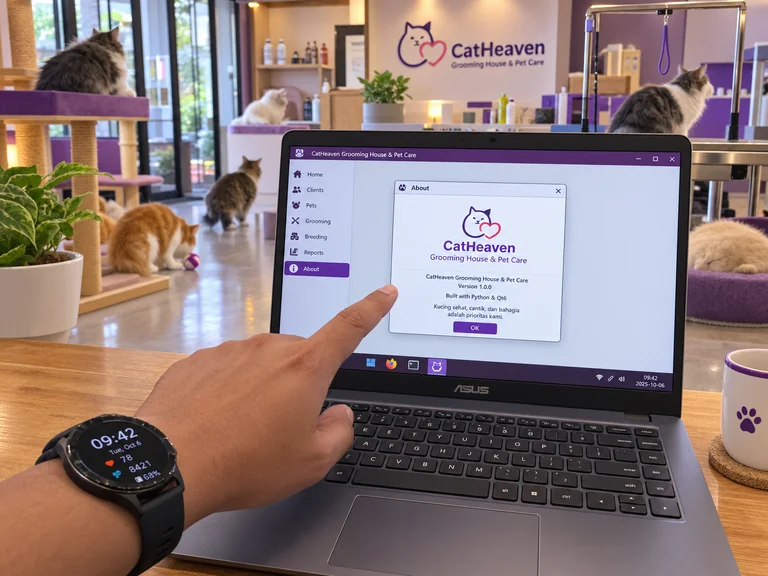
A friend of mine who is scaling up her cattery in town asked me to help her create a simple system to manage the breeding, matings, and general operations at her shop. Most people starting out with pedigree cats get the same advice: just throw everything into a Google Sheet, set up a Notion workspace, or sign up for a generic online cattery platform. She followed that path for a while too. At first, it felt fine—you note a kitten’s birth date, mark a vet visit, and maybe track a few weights. But the moment you’re juggling overlapping heat cycles, multi-generation pedigrees, medication schedules, and critical early weight drops, the whole thing turns into a messy tangle of broken formulas, overlapping tabs, and constant second-guessing.
Her frustration gave me a great reason to rethink the whole approach. Instead of relying on fragile spreadsheets or bloated browser tools, I decided to build her a dedicated desktop app using Python (PyQt6) with a local SQLite database, which makes far more sense for anyone serious about managing breeding records. It takes a bit more thought upfront than opening a ready-made template, but the difference in day-to-day use is night and day. You get a fast, private system that actually matches how a real cattery works, without the artificial limits that generic software always seems to hit.
Why a Dedicated Desktop UI Changes Everything
The biggest practical win with Python Qt6 is the complete control over how information is shown and connected. Breeding pedigree cats isn’t just keeping a static diary—it’s managing a web of related events that need to stay linked and visible. When the interface reacts instantly and can surface medical warnings without any lag, the daily work simply feels lighter.
Here are the workflows that make this setup genuinely useful:
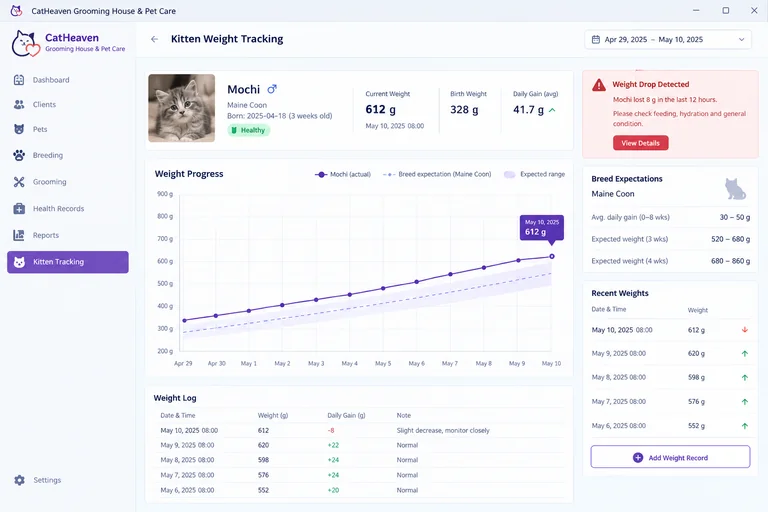
Kitten weight tracking in the first weeks is one of the most critical. From experience, spotting even a small drop within a twelve-hour window can be the difference between a healthy kitten and a crisis. With Qt6 you can feed weights straight into an interactive curve that compares daily gains against breed expectations right there on the screen.
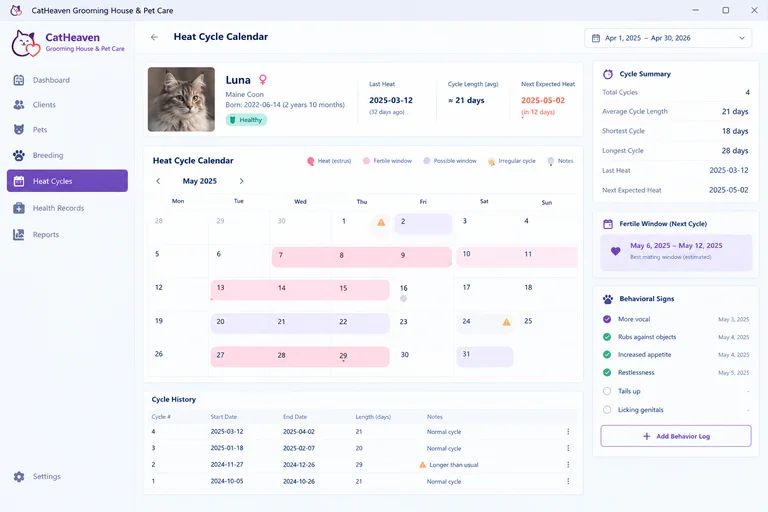
Heat cycles and fertile windows are another area where custom tools shine. Queens don’t follow neat textbook patterns—cycles shift with season, stress, and environment. A tailored calendar lets you log behavioral changes, flag irregular lengths, and get a clearer picture of the best mating windows.
Health and preventative care also become much cleaner. Vaccines, deworming, genetic tests, and bloodwork can all sit inside each cat’s profile. The app can generate upcoming booster reminders and flag when a planned pairing is due for updated health checks weeks ahead of time.
Mating records and pedigree checks benefit too. Exact mating dates can be tied to projected gestation, and visual family trees make it straightforward to review the coefficient of inbreeding before any pairing happens.
Over multiple seasons the data starts to tell a longer story. You can look at average litter sizes, complications, survival rates, and color distributions across specific lines—information that stays organized and ready when you need it.
These aren’t flashy extras. They’re the kind of long-term breeding insight that stays useful year after year when everything lives in one coherent place on your own machine.
Securing Sensitive Breeding Data with Microsoft Litebox
Pedigree records carry real value. Microchip numbers, registration papers, sales contracts, medical histories—this is the core intellectual property of a cattery. Uploading it all to a random cloud service always carries privacy risks, while leaving an unprotected local database sitting on a regular computer leaves it open to crashes or accidental interference.
Microsoft Litebox fits naturally into this setup. It provides an isolated, sandboxed environment for running lightweight workloads in secure containers. Instead of the application reading and writing straight to an unprotected file system, the database engine stays inside its own protected space.

LiteBox is a sandboxing library OS that drastically cuts down the interface to the host, thereby reducing attack surface. It focuses on easy interop of various “North” shims and “South” platforms. LiteBox is designed for usage in both kernel and non-kernel scenarios.
LiteBox exposes a Rust-y nix/rustix-inspired “North” interface when it is provided a Platform interface at its “South”. These interfaces allow for a wide variety of use-cases, easily allowing for connection between any of the North–South pairs.
For me, that sandbox layer delivers the same peace of mind I’d expect from a more formal server setup, without monthly hosting fees or complicated network configuration. Many people reach for Electron when they want a custom interface, but it tends to be heavy on memory. A lean Python Qt6 front end paired with a Litebox-sandboxed database stays light, launches quickly, and keeps the entire archive locked down locally.
When an Alternative Might Suit You Better
This approach isn’t ideal for every situation.
If your pet care relies on several people who need to update weights or notes from their phones while they’re actually in the pens, a cloud-based platform or shared mobile app is usually the more practical choice. A Qt6 desktop app means sitting down at a computer for data entry, which doesn’t suit every workflow.
And if you only keep a single breeding pair and produce a litter every couple of years, the effort of setting up Qt6 and configuring Litebox is almost certainly overkill. A simple paper binder or basic notes app is perfectly adequate for small-scale hobbyists.
Conclusion
If you treat your breeding program as a serious, multi-year craft, building a management system around Python Qt6 and Microsoft Litebox is hard to beat. You skip the ongoing costs of third-party subscriptions, keep full ownership of your pedigrees, and keep the records safely sandboxed on your own hardware. It’s a clean, practical foundation that grows with the cattery instead of getting in the way.