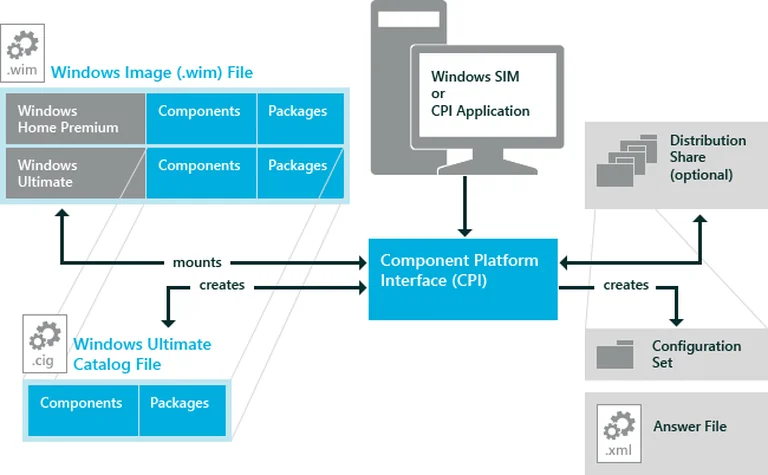
Are you’re messing around with Windows images and suddenly you get hit with that annoying Windows SIM was unable to generate a catalog error. Man, I’ve been there. It’s one of those errors that just stares at you like you did something wrong when really it’s just the tools being difficult. You’re looking at the screen and there it is, Windows SIM was unable to generate a catalog, and then the details say Unknown error 0xc1420127. It’s stupidly vague, right? Like, thanks Microsoft, that really helps me figure out what’s broken.
Anyway, if you’re seeing this, it basically means the Windows System Image Manager is tripping over itself while trying to process your WIM file. It can’t make that catalog file it needs to function. I’ve realized it usually comes down to a few specific things. It’s almost always about the version of the ADK you’re using, or maybe you’re mixing up architectures, or you’re just fighting with file permissions.
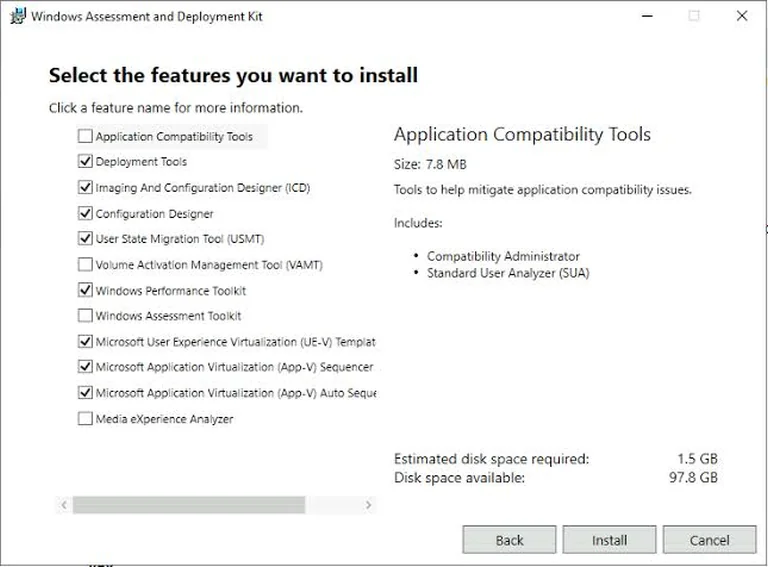
Let’s talk about the ADK first because that’s the big one. You know, Windows SIM isn’t just some standalone app you just download; it’s part of the Windows Assessment and Deployment Kit, the ADK. If you’re trying to work on a Windows 11 image but you’ve still got an old ADK from the Windows 10 days sitting on your machine, it’s probably going to fail. It’s like trying to play a PlayStation 5 disc in a PlayStation 2. It’s just not going to work. Microsoft is pretty specific about this—they want you to use the ADK version that actually matches the Windows version you’re messing with. If you have a bunch of different Windows versions in your office or whatever, just try to stick to the ADK that matches the newest OS you’re dealing with. You can check what you have installed by going into your Apps or Installed apps in Settings and looking for Windows Assessment and Deployment Kit. If it looks old, just go grab the new one from the Microsoft download page.
Oh, and there’s this whole architecture thing too. I forgot to mention that. It’s kind of a headache. The version of Windows SIM you’re running actually matters for which images you can catalog. Like, the x64 version of SIM has its own set of limitations and it can’t just do everything, and the x86 version is different too. If you’ve got an x64 Windows image, you really should be running SIM in a compatible x64 Windows environment. If you’re not sure what your system is, just go to Settings, then System, then About. It’ll tell you your System type right there. It sounds like a small detail but it’s a huge deal when you’re trying to generate a catalog.
Sometimes, even if you have the right version, the ADK itself might just be… broken. I don’t know, maybe a file got corrupted or something during an update. If you think that’s the case, you don’t necessarily have to uninstall everything and start over. You can actually try to repair it. Go back to that Installed apps menu, find the ADK, click those three little dots, and hit Modify. There should be a Repair option in there. Just run it, let it do its thing, and then—this is important—reboot your computer. Don’t skip the reboot, seriously.
One more thing that drives me crazy is permissions. Windows SIM needs to be able to read and write to that WIM file to do its job. If your Install.wim is marked as read-only, or if your user account doesn’t have the right permissions to touch it, the whole process just dies. I always recommend this little trick: don’t try to work directly off the installation media or some random external drive. Copy that Install.wim file to a local folder on your hard drive first. Like, make a folder called C:\WindowsImages and dump it in there. It’s much easier to manage permissions on a local folder than it is on a mounted ISO or a USB stick. Once it’s in your local folder, right-click it, go to Properties, hit the Security tab, and just make sure your account actually has permission to do stuff with it.

It’s a bit of a process, I know. It’s not like one simple button click fixes it, but usually, it’s one of those four things. Check the ADK version, check the architecture, try a repair, or fix the permissions. Most of the time, one of those will get you moving again.