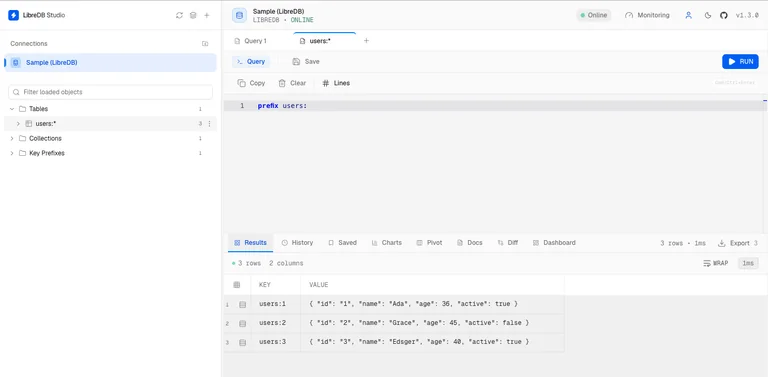
I have spent years bouncing between desktop database clients. TablePlus on one machine, DBeaver on another, a half-forgotten DataGrip license somewhere, and the occasional SSH tunnel that dies the moment my laptop sleeps. Every time a new Postgres instance appears in a private network, Kubernetes cluster, or customer VPC, the same ritual starts: open a port (and hope security review doesn’t notice), dig a tunnel, or install yet another client and hope the schema browser still works.
That ritual is the problem LibreDB Studio was built to kill.
LibreDB Studio is an open-source, browser-based database IDE that deploys next to your data instead of onto your laptop. One container (or Helm chart, or npx process) sits on the same network as the database. You open a URL. The whole team signs in with OIDC if you want. Nothing has to face the public internet, and nothing gets installed on anyone’s machine.
That architectural choice is the entire point.
The tool goes to the data
Most database tools still assume the old world: one developer, one laptop, one database they can reach. Databases have moved. They live in managed platforms that spin up in forty seconds, inside Kubernetes namespaces, or behind network policies that treat your laptop as an untrusted outsider. The clients never moved with them.
LibreDB Studio flips the direction. You create the database. You drop Studio beside it. Everyone who needs access simply opens a browser tab. The same interface works on a 4K monitor or a phone during an incident. There is no desktop install, no per-seat license, and no SSH tunnel that has to be re-dug every morning.
It supports a long list of engines through one consistent explorer, editor, and results grid: PostgreSQL, MySQL/MariaDB, Oracle, SQL Server, SQLite, DuckDB, MongoDB, Redis, ClickHouse, Elasticsearch/OpenSearch, Trino, Cassandra, Neo4j, Prometheus, Kafka, and many more (including a growing set of wire-compatible and specialized systems). Features such as ER diagrams, visual EXPLAIN, and schema diff appear where the engine can actually support them; the product is honest about the limits instead of papering them over.
What you actually get
Under the hood the SQL editor is Monaco (the same engine that powers VS Code). Completion is schema-aware, so it offers your tables and columns. You get multi-tab workspaces, formatting, snippets, visual execution plans for the engines that expose them, ER diagrams discovered from foreign keys, schema comparison with generated migration SQL (where safe), and a live health dashboard pulled from each engine’s own reporting interfaces.

There is also an optional AI layer that can explain plans or draft SQL from natural language. It uses your own model endpoint (Gemini, OpenAI, Ollama, or any compatible one). Generated statements stay in the editor for you to review; nothing runs automatically. A more advanced agent mode can investigate, optimize, or answer questions with a strict read-only boundary and evidence citations, but only on engines that can enforce that boundary.
Everything ships under the MIT license. SSO, RBAC, the audit trail of executed queries, and the AI helpers are not locked behind an enterprise edition. That is deliberate: the architecture only works if the tool can go everywhere.
Getting it running is almost boring
The quickest path is one command:
docker run -p 3000:3000 ghcr.io/libredb/libredb-studio:latest
Or, if you prefer not to use Docker:
npx @libredb/studio
Open http://localhost:3000. On first run the admin credentials are printed to the log. From there you add connections the same way you would in any modern client. For production you can use the Helm chart, the Kubernetes operator, one-click templates on various PaaS platforms, or embed the package inside your own product.
Because Studio lives on the same network as the database, you never have to expose the database port. The only thing that needs to be reachable is the Studio UI itself (and even that can sit behind your existing authentication and network controls).
Why this feels different
I have tried the “just use a desktop client + tunnel” approach for years. It works until the team grows, until someone is on a different machine, until a security review asks why port 5432 is open, or until the tunnel drops mid-incident. Cloud-hosted database UIs solve the access problem but often at the cost of putting your credentials and query traffic on someone else’s infrastructure.
LibreDB Studio sits in the middle: self-hosted, open source, full-featured, and designed for the way databases actually live now. It is not trying to be a flashy SaaS product. It is infrastructure that happens to be a good IDE.
Personal take
After years of juggling clients and tunnels, this is the first database tool that feels like it was built for the environments I actually work in. The fact that it is MIT-licensed with nothing held back removes the usual open-source bait-and-switch anxiety. The multi-engine support is broad enough that I can stop maintaining a zoo of specialized clients. And the “deploy next to the data” model finally matches how modern databases are provisioned.
It is still a young project in absolute terms, so expect the usual early-project rough edges on less common engines. But the core idea is solid, the implementation is serious, and the philosophy is the right one. If you are tired of treating database access as a networking problem, LibreDB Studio is worth spinning up for an afternoon. Chances are you will leave it running.