Skip to content

emka.web.id

menulis pengetahuan – merekam peradaban

Menu
  • Home
  • Tutorial
  • Search
Menu

Tutorial Windows: How to Enable Windows Defender Adware Blocking in Windows 10

Posted on December 1, 2015

Microsoft has recently added a new adware protection system for enterprises, allowing them to detect and block Potentially Unwanted Applications (also known as PUAs) on their computers.

But according to Microsoft’s own announcement, this feature was only available for enterprises, so consumers running Windows 10 Home or Pro, for example, aren’t getting it.

And yet, there’s a very simple way to enable this feature on any computer with Windows Defender, and as gHacks notes, it all comes down to just a few registry tweaks.

Before anything, make sure you create a backup or a system restore point, just in case something goes wrong and you need to recover your Windows install.

How to enable adware blocking

First and foremost, launch the Registry Editor. To do this, click the Start menu and type “regedit.exe.” Navigate to the following path:

HKEY_LOCAL_MACHINESoftwarePoliciesMicrosoftWindows Defender

Double click the Windows Defender folder to expand it, right-click it and hit the New > Key option to create a new entry called “MpEngine” (without the quotes). Right-click this newly-created key called MpEngine and select New > DWord (32-bit) Value and call the new entry “MpEnablePus” (again without the quotes). Double-click it, enter value 1, click OK, and restart your computer.

Your settings should look exactly like in the screenshot at the end of the article.

There’s one major thing that you need to take into account. Enabling adware protection in Windows Defender is a double-edged sword. While it can indeed prevent some unwanted apps from running on your PC, it could also block legitimate software, so always keep an eye on Windows Defender to see which executables are allowed and which are not.

On the good side, exes that are found to be dangerous are automatically quarantined, so you can always whitelist and run them as a legitimate app.

It’s probably a matter of time until Microsoft makes this option available by default in Windows Defender for all users, but in the meantime, this trick surely comes in very handy.
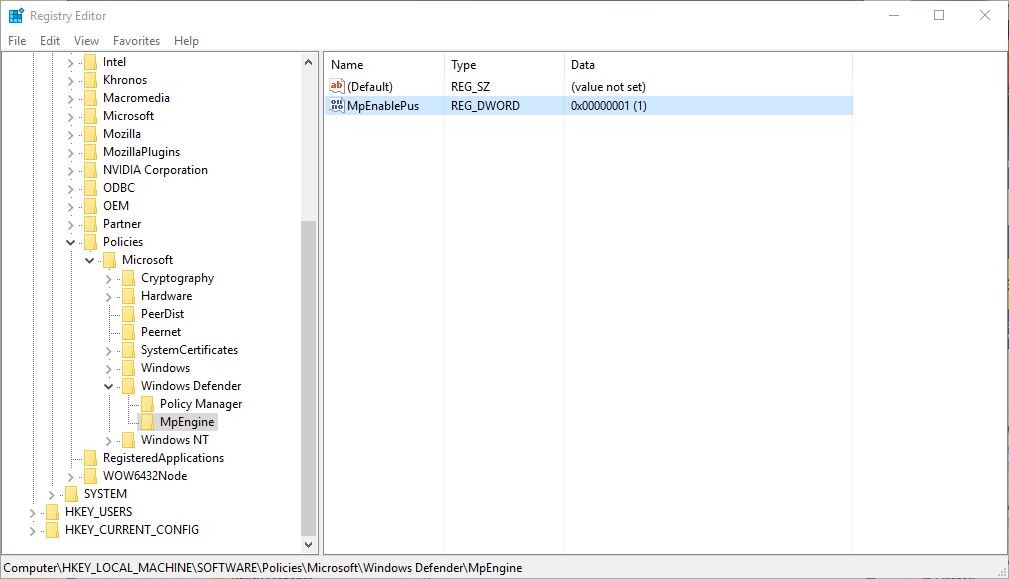
This is how your settings should look like with the new keys

This is how your settings should look like with the new keys

Terbaru

  • Hasil Penelitian: Boneka Melatih Kecerdasan Emosional Anak
  • SALAH! MIT Ungkap AI Tidak Ganti Karyawan Karena Efisiensi
  • Inilah Inovasi Terbaru Profesor UI: Pelumas Mobil dari Minyak Nabati!
  • Daftar Sekarang! Beasiswa S2 di Italia dari IYT Scholarship 2026 Sudah Dibuka
  • Sejarah Hantavirus dan Perkembangannya Sampai ke Indonesia
  • Kementerian Pendidikan: Mapel Bahasa Inggris Wajib di SD Mulai 2027!
  • Ketua Fraksi PKB MPR-RI: Kemenag Respon Cepat Pendidikan Santri Ndolo Kusumo Pati yang Terdampak
  • Viral Video Sejoli Di Balai Kota Panggul Trenggalek, Satpol PP Janji Usut
  • Video Viral Wakil Wali Kota Batam Tegur Keras Pasir Ilegal
  • LPDP Buka Peluang Beasiswa S3 Prancis 2026, Simak Syaratnya!
  • Inilah Panduan Lengkap dan Aturan Main Seleksi Penerimaan Murid Baru (SPMB) SMA dan SMK Negeri Jawa Tengah Tahun 2026
  • Inilah Syarat dan Cara Daftar MOFA Taiwan Fellowship 2027
  • RESMI! Inilah Macam Jalur di SPMB Sekolah Tahun Ajaran 2026
  • Ini Loh Rute Terbaru TransJOGJA Per Mei 2026, Jangan Salah Naik!
  • Inilah Jadwal Operasional MRT Jakarta Per Mei 2026, Berubah Dimana?
  • Inilah Syarat dan Mekanisme Seleksi Siswa Unggul ITB Jalur Talenta (OSN, Seniman, Hafidz, Atlet dll) 2026/2027
  • Inilah Daftar Saham Farmasi di BEI Per Mei 2026, Pilih Mana?
  • Kesehatan Mental Itu Penting: Inilah Isi Chat Terakhir Karyawan Minimarket Sukabumi Bundir
  • Inilah Kampus Swasta Terbaik Jurusan Farmasi di Area Malang Raya
  • Cara Login EMIS 4.0 Kemenag Terbaru 2026 Pakai Akun Lembaga dan PTK Guru Madrasah Aktivasi
  • Survei Parpol Terbaru: Gerindra Unggul, PDIP Ketiga, PKB 5%
  • PKB Resmi Jalin Kerjasama dengan Institut Teknologi & Sains NU Kalimantan
  • Inilah Urutan Terbaru Pangkat TNI Angkatan Darat! (Update 2026)
  • Inilah Panduan Lengkap Operator Sekolah Mengelola SPTJM e-Ijazah dan Menghindari Kesalahan Fatal Data Kelulusan
  • Inilah Syarat dan Penilaian Seleksi Siswa Unggul ITB Jalur UTBK
  • Download Video Viral Guru Bahasa Inggris? Awas Berisi Virus!
  • PKB Minta Kasus C4bul Pendiri Ponpes Pati Tidak Ada Ampunan & Tuntutan Maksimal
  • Inilah Kronologi Video Viral Preman vs Sopir Di Sumedang
  • Ini Alasan UKP Pariwisata Disindir Konten Kreator Drone Gunung Rinjani
  • Inilah Kronologi Viral Video Dugaan Asusila Pegawai Disdik Pasuruan di Mobil Dinas
  • How to build a high-performance private photo cloud with Immich and TrueNAS SCALE
  • How to Build an Endgame Local AI Agent Setup Using an 8-Node NVIDIA Cluster with 1TB Memory
  • How to Master Windows Event Logs to Level Up Your Cybersecurity Investigations and SOC Career
  • How to Build Ultra-Resilient Databases with Amazon Aurora Global Database and RDS Proxy for Maximum Uptime and Performance
  • How to Build Real-Time Personalization Systems Using AWS Agentic AI to Make Every User Feel Special
  • How to Automate Your Entire SEO Strategy Using a Swarm of 100 Free AI Agents Working in Parallel
  • How to create professional presentations easily using NotebookLM’s AI power for school projects and beyond
  • How to Master SEO Automation with Google Gemini 3.1 Flash-Lite in Google AI Studio
  • How to create viral AI video ads and complete brand assets using the Claude and Higgsfield MCP integration
  • How to Transform Your Mac Into a Supercharged AI Assistant with Perplexity Personal Computer
  • Apa itu Spear-Phishing via npm? Ini Pengertian dan Cara Kerjanya yang Makin Licin
  • Apa Itu Predator Spyware? Ini Pengertian dan Kontroversi Penghapusan Sanksinya
  • Mengenal Apa itu TONESHELL: Backdoor Berbahaya dari Kelompok Mustang Panda
  • Siapa itu Kelompok Hacker Silver Fox?
  • Apa itu CVE-2025-52691 SmarterMail? Celah Keamanan Paling Berbahaya Tahun 2025

©2026 emka.web.id | Design: Newspaperly WordPress Theme