Skip to content

emka.web.id

writing knowledge, recording civilization

Menu
  • Home
  • Tutorial
  • Search
Menu

Wayland Driver for Wine Mendapatkan Dukungan OpenGL dan Banyak Fitur Baru di tahun 2024

Posted on January 31, 2024


Colllabora berbagi dengan kami hari ini ulasan singkat dan pandangan ke depan untuk pekerjaan yang sedang berlangsung pada driver Wayland untuk Wine, serta melihat beberapa fitur yang akan sangat bagus untuk dimiliki pada akhirnya.

Driver Wayland untuk Wine baru saja memulai debutnya dengan rilis Wine 9.0 dari lapisan kompatibilitas sumber terbuka dan gratis yang memungkinkan Anda menjalankan aplikasi dan game yang dikembangkan untuk sistem Windows pada sistem operasi mirip Unix.

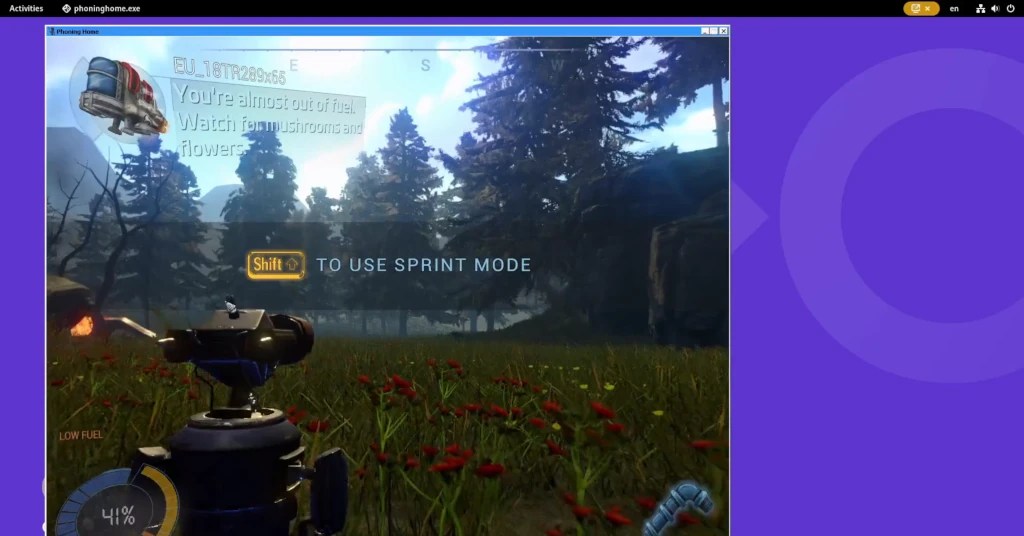
Meskipun driver Wayland untuk Wine saat ini dalam keadaan eksperimental, driver ini memiliki fitur jendela dasar dukungan manajemen seperti layar penuh, maksimalisasi, pengubahan ukuran, dll., rendering perangkat lunak, dukungan mouse dan keyboard (termasuk penanganan mouselook dan keymap), dukungan dasar HiDPI, dan dukungan Vulkan (termasuk Direct3D melalui WineD3D/Vulkan atau DXVK).

Untuk tahun 2024, Collabora ingin menghadirkan lebih banyak fitur baru ke driver Wayland untuk Wine, termasuk dukungan OpenGL, emulasi perubahan mode tampilan melalui penskalaan kompositor, dukungan minimalisasi jendela, dukungan clipboard, dukungan drag-and-drop, peningkatan posisi jendela sementara (mis. popup, menu, dll.), serta peningkatan ketahanan umum.
(adsbygoogle = jendela.adsbygoogle || []).push({});
“Tujuan kami adalah untuk maju dari tahap percobaan dan menjadikan driver sebagai komponen hulu yang tepat. Setahun kemudian, setelah beberapa permintaan penggabungan, banyak orang kini sudah dapat menggunakan rilis Wine terbaru untuk menikmati beberapa aplikasi Windows favorit mereka dalam lingkungan yang sepenuhnya bebas X11,” tulis Alexandros Frantzis dalam postingan blog.
Selain itu pekerjaan yang mereka rencanakan untuk diterapkan sepanjang tahun 2024, Collabora juga berharap dapat mengerjakan fitur-fitur lain yang nantinya akan sangat berguna, termasuk dukungan untuk deteksi otomatis DPI sistem, penanganan DPI per-monitor di inti Wine, rendering lintas proses, dan integrasi dengan protokol manajemen warna (dan HDR) Wayland yang akan datang.

Bagi Anda yang ingin menguji driver Wayland di Wine 9.0 perlu mengaktifkannya melalui kunci registri HKCUSoftwareWineDrivers dengan menjalankan wine reg.exe add HKCU Software\Wine\Drivers /v Graphics /d x11, perintah wayland dan kemudian hapus variabel lingkungan DISPLAY.

Kredit gambar: Collabora

Sumber: Google, 9to5linux.com

Terbaru

  • Engineering the On-Premises AI Data Center: An In-Depth Technical Review of the HP ZGX Fury AI Station
  • Trying my new Favourite Task Manager, TMOG on Omarchy Linux
  • ASRock Industrial AI Box A395: Is This the Best Compact Strix Halo System for Local AI?
  • Redox OS: A Rust-Based Microkernel Operating System (And How It Differs from Linux)
  • Canonical Is Bringing Back Ubuntu Core Desktop — This Time With a Clearer Plan
  • systemd Officially Adds Support for Rust Components
  • Rocky Linux Creator Builds a Brand-New “Not Linux” Kernel in 11 Days Using AI
  • Building a local AI agent in Workshop on Ubuntu 26.10
  • Omarchy 4.5 RC: 5 New Apps That Actually Look Useful
  • Worth It! Switching from Fedora KDE to Kubuntu
  • I’m Happy Using ‘Herdr’, The Fastest Growing Devtool written in Rust
  • Testing Goose on Omarchy Linux (App & CLI): The Open-Source Solution for Daily Task Automation
  • GNOME Founder Attacks Omarchy Founder as “Lazy, Racist, Ignorant”
  • Why I Stopped Using Plain Command Line Docker and Use Portainer 3.0 To Make My Home Projects Fun Again
  • Why I Switched to a Proper Firewall Box with OPNSense for My Homelab Stuff
  • Fixing Windows Error 0x80070005 Hyper-V Export Access Denied Error the Right Way
  • Fixing Hyper V Export Errors and Building a Better Virtual Machine Setup (error 0x80070002, 0x80070005)
  • Fixing the Dreaded Windows Audio Service Stuck on Stopping Error
  • Windows SIM Error, Unknown error 0xc1420127
  • How I’m Building a Cat Breeding Management App with Python Qt6 + Microsoft Litebox, in 1 Week
  • Why Windows Keeps Nuking Your GPU Drivers (And How to Take Back Control)
  • Why I Finally Ditched Mainstream Windows Cleaners (And Why I Use ‘Kudu’ Instead)
  • AI Made Everything Faster, Including Bad Decisions
  • Raspberry Pi Desktop Available of PC and Mac, Based on Debian 13
  • Why I Stopped Yelling at My PC When Error; Getting Windows 11 Voice Isolation and Access to Actually Work
  • Berobat Kanker ke Malaysia: Berapa Biayanya dan Apa Saja yang Perlu Disiapkan?
  • Stop Sending Every Prompt to the Biggest AI Model You Can Find
  • Stop Building AI Agents from Scratch: My Pick for the Best Native Windows Setup
  • Jev Is Faster and Cheaper, But I Still Recommend Clef. Here’s Why.
  • Weird XCP-NG Bug or Feature? Enable Maintenance Mode = Host Not Enough Memory
  • Canonical: Ubuntu coming soon to Snapdragon X2 Series platforms
  • Finally, wolfSSL adds post-quantum algorithms!
  • How to Run Gemma Embedding Models Using Docker
  • Deploy Nginx Rootful Container with Podman
  • How to Sandboxing Browser on Linux Desktop with Flatpak
  • Liquid AI Unveils LFM3: A New Generation of Multimodal Foundation Models Built Small Device
  • Google DeepMind Unveils Genie 4: The Most Advanced Real-Time Interactive World Model Yet
  • Building Long-Running AI Agents with Pi Durable: An AI SRE Agent Example
  • Prompt AI: Impressionist Portrait Art of a Woman
  • Prompt AI: Stylish Man Walking Double Exposure Photo
  • Lagi rame foto Ohyul sama Ryul LNGSHOT pas di Berlin, ternyata ini tanggal aslinya biar nggak salah cari di Weverse
  • Lagi rame foto Ohyul sama Ryul LNGSHOT pas di Berlin, ternyata ini tanggal aslinya biar nggak salah cari di Weverse
  • Siapa Karisma Adys Safira? Profil Istri Axel Hadiningrat sing Lagi Rame Diomongke Warga
  • Alvin Tedjo menang jadi Wali Kota di Kanada, wong Indonesia kok iso dadi pemimpin kota gede?
  • Messi vs Ronaldo rebutan gelar Ballon d’Or of All Time, siapa yang paling jago menurut fans?

©2026 emka.web.id | Design: Newspaperly WordPress Theme