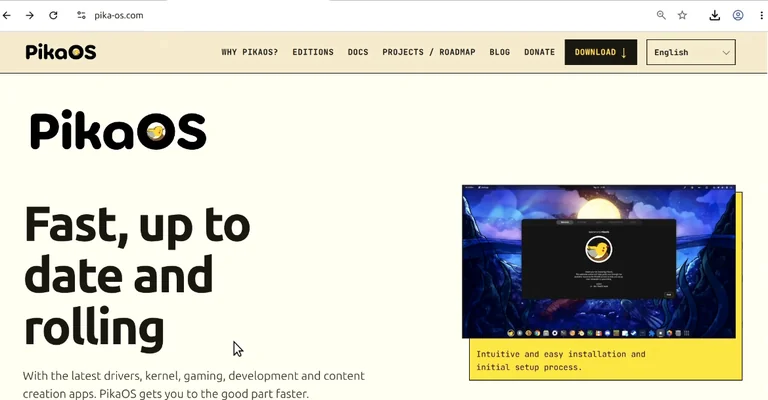
The desktop Linux space has undergone a noticeable shift over the past two years. Distributions are no longer simply competing on which desktop environment they bundle; they are actively optimizing the kernel scheduler, package management, graphics driver delivery, and hardware compatibility layers to satisfy high-demand users. Gamers and content creators, in particular, demand low latency, bleeding edge GPU drivers, and seamless access to proprietary tools without sacrificing the stability of their base operating system.
In this hardware review and configuration analysis, I examine PikaOS. Often misheard or transcribed as PAOS, PikaOS is an ambitious distribution that attempts something rare in the ecosystem: taking Debian as a foundation and turning it into a responsive, up to date, rolling release platform specifically tuned for gaming and multimedia workloads.
Here is a comprehensive breakdown of how PikaOS performs on bare metal, its architectural choices, installation quirks, driver mechanics, and how it holds up against leading specialized alternatives like CachyOS and Bazzite.
+-----------------------------------------------------------------------+
|                           PikaOS Overview                             |
+-----------------------------------------------------------------------+
| Base System       | Debian Unstable (Sid)                             |
| Release Model     | Continuous Rolling Release                        |
| Kernel            | Custom low-latency Linux kernel                   |
| Architecture      | x86-64-v3 required (Intel Haswell / AMD Zen+)     |
| Desktop Flavors   | KDE Plasma, GNOME, Hyprland, Niri, COSMIC         |
| Primary Audience  | Gamers, multimedia producers, power users         |
+-----------------------------------------------------------------------+
Architectural Foundation: Rolling Debian Sid with Custom Tooling
Debian is universally known for rock-solid stability, but that stability generally comes at the expense of package freshness. Debian Stable often carries older software versions that can hinder modern gaming frameworks like Proton, Wine, or the latest Mesa graphics drivers.
PikaOS sidesteps this constraint by basing its repositories on Debian Sid (the Unstable development branch). By doing so, the operating system functions as a true rolling distribution. Users receive constant, continuous software updates rather than waiting for scheduled point releases every six to twelve months.
To make Debian Sid viable for competitive desktop use, the PikaOS development team layered several custom components on top of the base system:
- A custom-compiled Linux kernel configured with performance patches, alternative schedulers, and optimized timers for lower input latency.
- A maintained graphics driver stack providing fast updates for both open-source Mesa drivers and proprietary Nvidia display drivers.
- Custom system management utilities, including a dedicated welcome wizard, kernel manager, update manager, and device driver manager.
- An architecture baseline set strictly to x86-64-v3.
This microarchitecture requirement means PikaOS cannot run on legacy 32-bit or early 64-bit hardware. Your system must feature an instruction set compatible with AMD Ryzen processors or fourth-generation Intel Core (Haswell) chips or newer. For modern hardware builds, this allows compiled binaries to take full advantage of AVX and AVX2 vector extensions, improving CPU throughput during compute-heavy tasks.
Installation Mechanics and Disk Management
For this hands-on evaluation, I deployed PikaOS on a physical test bench featuring an Intel Core i5-10400 processor, an Nvidia GeForce GT 1030 discrete graphics card, and a dedicated Samsung solid-state drive.
PikaOS offers ISO images across five distinct desktop environments: KDE Plasma, GNOME, Hyprland, Niri, and System76’s Rust-based COSMIC. For users migrating away from Microsoft Windows, KDE Plasma offers the most intuitive desktop metaphor and powerful display scaling options, making it the ideal candidate for our test run.
The download portal splits images into two categories: Standard and Nvidia. The Nvidia-specific image targets modern GPUs, explicitly GeForce GTX 1650 cards, RTX series, or newer hardware. Because our test bench relies on a legacy GT 1030 (a Pascal-based card), the standard ISO is the appropriate selection.
                    +------------------------------------+
                    |       PikaOS ISO Selection         |
                    +------------------------------------+
                                      |
                 +--------------------+--------------------+
                 |                                         |
                 v                                         v
       [ Nvidia Specialized ISO ]                 [ Standard ISO ]
        - RTX Series                              - AMD Radeon GPUs
        - GTX 1650 and newer                      - Intel Arc / HD Graphics
        - Modern 500+ series drivers              - Legacy Nvidia (GT 1030, etc.)
I flashed the standard ISO onto a USB flash drive using BalenaEtcher. The system booted directly into a live environment powered by the rEFInd boot manager, complete with PikaOS’s signature yellow bird artwork.
The Custom Setup Wizard
Rather than using an unmodified generic Calamares installer, PikaOS splits setup between a streamlined disk deployment step and a post-boot welcome wizard.
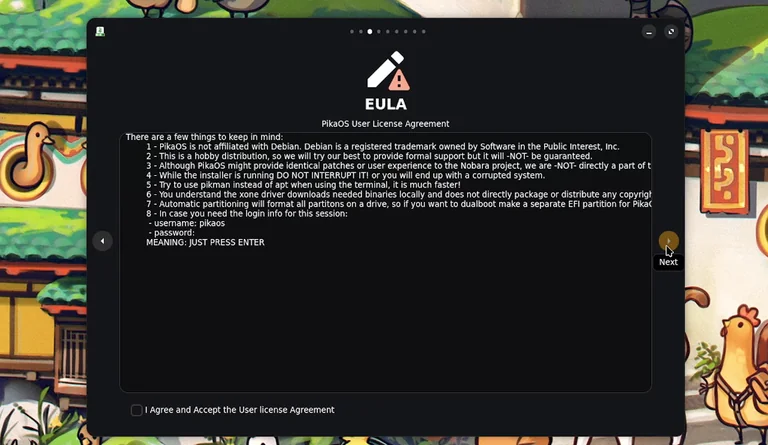
The disk partitioning module provides both fully automated and granular manual layout tools. When opting for automated provisioning on the Samsung SSD, drilling down into the advanced configuration menu reveals several welcome technical toggles:
- File System Choice: PikaOS defaults to XFS. While XFS provides exceptional scalability for large data operations, many desktop users prefer ext4 for its proven resilience during unplanned power interruptions, or Btrfs for snapshot support. The installer allows you to override the default and select ext4 effortlessly.
- Partition Segregation: The installer allows you to isolate the
/homedirectory onto its own dedicated partition with custom size caps, keeping user data independent of system root. - Boot Selection Timeout: PikaOS exposes a rEFInd boot menu timeout setting directly inside the graphical installer. You can set the countdown timer to four seconds, keep it persistent, or bypass the menu entirely for faster cold boots. This is a subtle yet refreshing touch rarely seen in mainstream graphical installers.
Once partitions are written, the core system packages deploy quickly, prompting a clean reboot straight into the secondary configuration phase.
Post-Boot Configuration and Driver Management
Following the initial reboot, PikaOS launches its post-installation configuration wizard to handle user credentials, network initialization, and software extras.
+---------------------------------------------------------------------------+
|                        Post-Installation Pipeline                         |
+---------------------------------------------------------------------------+
| [1. Network Setup]    Detects wired Ethernet or scans wireless SSIDs      |
| [2. User Creation]    Configures root privileges, user account, hostname  |
| [3. Driver Probe]     Scans PCI bus for graphics adapters                 |
| [4. Codec Deployment] Installs non-free audio and video decoding libraries|
| [5. Gaming Packages]  Deploys Wine, Proton dependencies, Lutris, and Steam|
+---------------------------------------------------------------------------+
The Nvidia Driver Dilemma
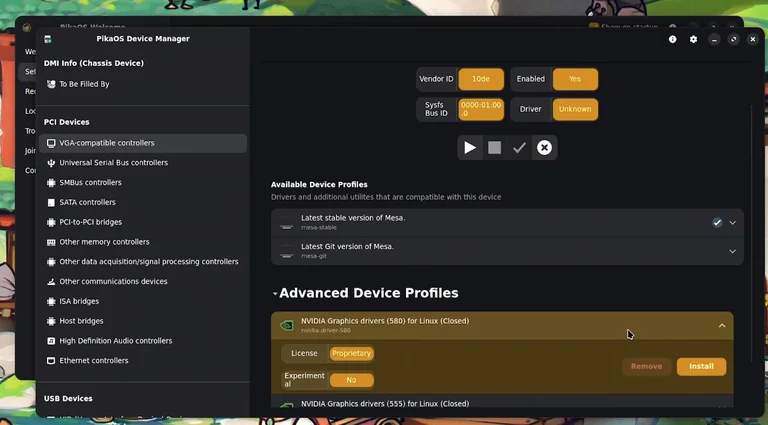
The first hurdle emerged during the automated hardware scanning routine. For the GT 1030 card, the setup wizard defaulted to the open-source Mesa Nouveau driver rather than fetching a proprietary Nvidia binary.
Distributions like Ubuntu LTS and Bazzite usually query hardware PCI IDs during installation and immediately match legacy cards to their appropriate proprietary drivers (such as the legacy 470.xx or 535.xx branches). PikaOS required manual configuration here.
To resolve this without falling back to a terminal session:
- Launch the custom PikaOS Device Manager from the desktop welcome hub.
- Navigate to VGA Compatible Controllers and inspect the GT 1030 entry.
- Bypass the basic driver list and open Advanced Device Profiles.
- Select the proprietary Nvidia production driver stack (such as the 5xx series or legacy branch compatible with your hardware) and apply the changes.
The utility retrieved, compiled, and configured the proprietary kernel modules cleanly, indicated by a green completion status. Upon a subsequent reboot, the official Nvidia X Server Settings panel was fully active, enabling proper clock states, thermal monitoring, and hardware acceleration.
While advanced users will have no trouble navigating this workflow, users moving over from turn-key platforms should know that legacy GPUs require this quick detour through the Device Manager.
Software and Gaming Meta-Packages
PikaOS streamlines post-install configuration through its Recommended Additions menu:
- Multimedia Codecs: Installs proprietary audio/video codecs needed to play restricted media containers smoothly.
- Gaming Meta-Package: One-click installation of Steam, Lutris, Wine, Proton layers, and system-level controller configurations for Xbox, PlayStation, and third-party gamepads.
- Microsoft TrueType Core Fonts: A critical package for office document compatibility. Without fonts like Arial, Times New Roman, and Calibri installed, documents imported from Microsoft Office into LibreOffice or OnlyOffice will suffer from font substitution and broken line formatting.
Desktop Usability and System Overhead
The KDE Plasma implementation in PikaOS is clean, responsive, and lightweight. The default application payload avoids bloat, clocking in at an initial download footprint of roughly 3 GB.
+---------------------------------------------------------------+
|                      Application Suite                        |
+---------------------------------------------------------------+
| Web Browser          | Chromium                               |
| Text Editor          | Kate                                   |
| Package Manager      | KDE Discover Software Center           |
| Gaming Platform      | Steam, Lutris, Proton Tricks           |
| Switchable Graphics  | SuperGFX Control Panel Applet          |
| Productivity Suite   | None pre-installed (User Choice)       |
+---------------------------------------------------------------+
The system tray integrates a dedicated SuperGFX applet. For mobile workstations and hybrid gaming laptops equipped with an integrated CPU graphics engine alongside a discrete GPU, this applet provides one-click switching between integrated power-saving modes, hybrid compute mode, and dedicated GPU rendering.
Resource consumption is well within expectations for an optimized KDE Plasma desktop. Freshly booted with no active user applications running, background memory consumption hovers around 1.8 GB to 2.0 GB of RAM. The PikaOS System Monitor utility breaks down memory pressure clearly, allowing you to quickly spot background tasks such as Steam autostart services.
Media Production: Testing DaVinci Resolve on Debian Sid
A solid distribution for creators must handle demanding creative tools without stability issues. DaVinci Resolve serves as an excellent benchmark for this, as it is notoriously picky about GPU driver implementations, OpenCL runtimes, and Linux library packaging.
Because PikaOS builds upon Debian packaging conventions, deploying DaVinci Resolve is straightforward:
- Download the official Linux installer archive from Blackmagic Design.
- Utilize Daniel Tufvesson’s widely respected
make-resolve-debutility to repackage the raw run installer into a native.debarchive. - Install the resulting package via standard package management tools:
sudo dpkg -i davinci-resolve_*.deb
Thanks to the proprietary Nvidia driver configured earlier, DaVinci Resolve recognized the GPU’s OpenCL and CUDA compute layers without missing a beat. Timeline scrubbing on 1080p and 4K source media ran smoothly, and project delivery completed without stability hiccups or application crashes.
Despite operating on top of Debian Sid’s rolling package pool, PikaOS provided an uninterrupted, rock-solid workspace during content creation workloads.
Technical Comparison: PikaOS vs CachyOS vs Bazzite
To put PikaOS in perspective, it helps to compare it against two of the most popular gaming-focused Linux distributions available right now: CachyOS and Bazzite.
I have evaluated all three operating systems on identical hardware, and while they share similar goals, their internal architectures differ substantially.
+---------------------------------------------------------------------------------------------------+
| Feature               | PikaOS                    | CachyOS                   | Bazzite                   |
+---------------------------------------------------------------------------------------------------+
| Base Distribution     | Debian Sid                | Arch Linux                | Fedora Silverblue         |
| System Design         | Traditional (Read/Write)  | Traditional (Read/Write)  | Atomic (Immutable Root)   |
| Package Management    | APT / DPKG                | Pacman / ALHP Repos       | Flatpak / RPM-OSTree      |
| Update Model          | Rolling                   | Rolling                   | Image-Based Atomicity     |
| Default GPU Handling  | Manual config for legacy  | Fully automated setup     | Fully automated setup     |
| Primary Strength      | Custom Debian tooling     | Extreme CPU optimizations | Bulletproof immutability  |
+---------------------------------------------------------------------------------------------------+
1. PikaOS
PikaOS offers a familiar, traditional filesystem layout with read-write root permissions and Debian package management. Its custom installer, modular kernel manager, and integrated device managers bridge the gap between Debian’s deep packaging ecosystem and modern gaming performance demands. It is an ideal fit for users who want Debian stability with the advantages of a rolling release.
2. CachyOS
Based on Arch Linux, CachyOS focuses heavily on raw CPU performance optimizations. Upstream software packages are recompiled specifically for x86-64-v3 and x86-64-v4 microarchitectures. It pairs this with custom kernels featuring the BORE (Burst-Oriented Response Enhancer) CPU scheduler. Driver automation on CachyOS is first-class, immediately identifying and provisioning legacy Nvidia hardware without manual setup.
3. Bazzite
Bazzite takes an entirely different architectural path. Built upon Fedora’s Silverblue immutable runtime, the operating system root is read-only. Updates are delivered as signed, atomic container images, making it almost impossible to break the core operating system through botched package updates. Software is primarily isolated via Flatpak and Container containers. Furthermore, Bazzite automatically integrates custom DaVinci Resolve build containers and provisions display drivers right out of the gate.
For pure hands-off reliability, Bazzite remains the most resilient for living-room setups and handheld consoles. However, for users who dislike containerized workflows and want an unconstrained, traditional packaging system, PikaOS stands out as an exceptional workstation alternative.
Conclusion
PikaOS demonstrates that Debian does not have to remain locked in conservative, slow-moving release cycles. By pairing the rapid package delivery of Debian Sid with a low-latency kernel, a custom driver infrastructure, and practical system setup tools, PikaOS succeeds in building a balanced, high-performance desktop operating system.
While the distribution could improve by automating proprietary driver selection for older Nvidia cards during setup, its integrated graphical Device Manager provides an easy fix without forcing users to touch the terminal.
For engineers, video editors, and PC gamers looking to leave Windows behind without adopting the maintenance demands of raw Arch Linux or the file system restrictions of an immutable OS, PikaOS presents a unique, capable, and well-rounded alternative.
Source: ExplainingComputer