Today I want to talk about something that literally every developer has to deal with at some point. Let us talk about rate limiting. Basically, this is the art of protecting our applications in going down when we get a massive spike in user requests.
If you are building backend or web application today, you absolutely have to implement some form of rate limiting. But the big question that always pops up on forums and message boards is about the actual strategy. How do we actually do it properly?
Someone recently asked me a really good question about handling brute force attacks and preventing website crashes. They mentioned that they only knew how to do rate limiting at the application code level, but then they read that you can actually do it at the web server level using something like Nginx, or at the load balancer, or even the API gateway. And yes, that is completely correct! You do not have to put this logic purely inside your application code. Doing it at the edge or gateway level is actually standard practice.
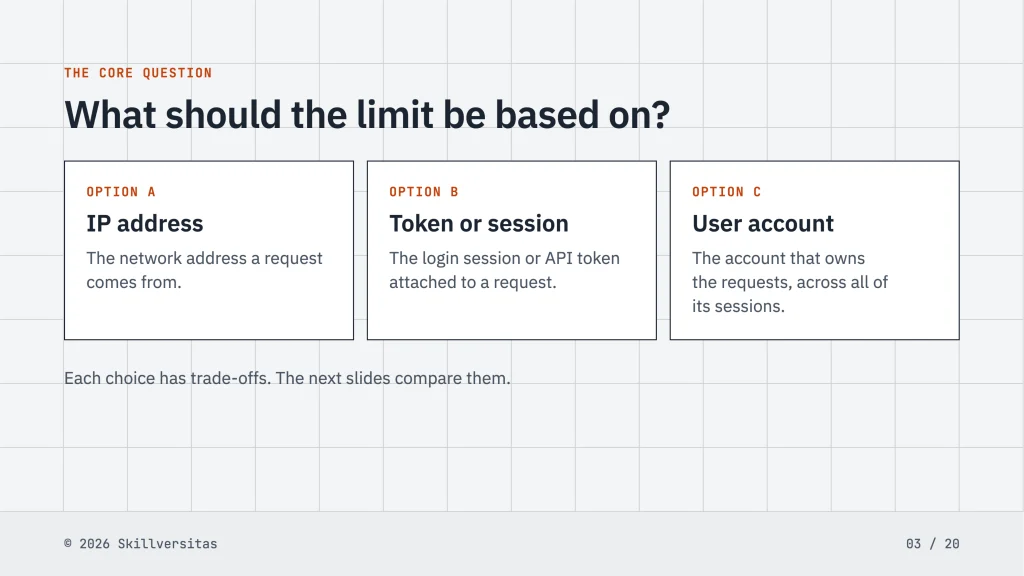
But their main question was about the strategy itself. Should we limit requests per IP address, per token, or per user? Because a single user can have multiple login sessions or tokens. Let me break down my thoughts on this, because there is a lot of bad advice out there.
First, let us talk about the most common advice you will find online. A lot of people will tell you to just rate limit by IP address. Let me be completely honest with you right now. I do not recommend this approach at all. It is actually a very dangerous decision.
Why? Because an IP address is not unique to a single user. There is this thing called CGNAT (Carrier-Grade NAT) used by many Internet Service Providers. Basically, an ISP might assign the exact same public IP address to an entire neighborhood, or sometimes even a whole city! I have checked my own connection before, and my IP address was registered to a completely different area shared by thousands of other people.
Imagine you set a limit of 100 requests per minute per IP address. Then you launch a massive promo campaign. Suddenly, a lot of traffics comes from one specific city where everyone shares the same ISP. Because they all share the same IP, your server blocks all of them. You might be trying to block one single malicious bot, but you end up blocking an entire city. That is a disaster for your business. We don’t want no innocent users getting blocked just because they share an internet provider. So, blocking by IP is completely off the table for me.
Alright, so what about limiting by session token?
When a person logs into your app, they generate a session token. They might log in on their phone, their laptop, and their tablet. Each device has its own token. Some developers think limiting requests per token is the answer. Let us say you allow 100 requests per minute per token.
This sounds okay until you realize how easily hackers can bypass it. One of the biggest mistake I see is underestimating botnets. A malicious attacker can simply write a script to generate thousands of tokens. They just keep logging in over and over again. If they create 1,000 tokens, and each token is allowed 100 requests per minute, they can now hit your server with 100,000 requests per minute. Your application will still die. So, the token method is easily abused unless you put a strict cap on how many active sessions a single account can hold.
This brings us to the third option, which is rate limiting per user account.
Instead of looking at the IP or the token, you tie the limit to the actual user ID in your database. Even if I generate 1,000 tokens across 1,000 devices, my user ID remains the same. If the system says my user ID is only allowed 100 requests per minute, it does not matter how many tokens I use. The system will throttle me.
Compared to the other methods, this method is more safer. You do not block innocent people sharing an IP, and you stop individuals from abusing multiple tokens. Every user have their own limits strictly enforced by the system.
But wait, we are not done. While limiting per user is great for stopping individual abuse, it does not guarantee your server will survive a massive marketing event.
Let us use a real world example. Imagine you are selling concert tickets for a massive K-pop group like BTS. You set your rate limit to 100 requests per minute per user. That is a very reasonable limit. But then, the ticket sales open.
Suddenly, you have two million real, legitimate fans logging in at the exact same second. Even if every single person is perfectly following your rate limit rule, two million people sending even one request at the same time is going to destroy your infrastructure. Being a developer, the server crashed miserably because of the sheer volume of legitimate traffic.
You might think, well, why don’t we just spin up more servers? Sure, you could do that. But running enough servers to handle two million simultaneous users just for a one hour ticket sale is incredibly expensive. It is not cost effective. You will spend more money on cloud computing than you make on the tickets.
So, if rate limiting per user does not save us from massive legitimate traffic spikes, what is the actual solution?
This is where we need to fix a common misunderstanding in terminology. In the IT world, there is a rate limiting algorithm called the Token Bucket. It controls the flow of data. But for huge events like ticket sales, we use a different concept that people often casually call a “bucket” or an “ember” in local slang, but the correct industry term is a Virtual Waiting Room combined with queue management.
Here is how the big e-commerce and travel websites handle it today. The logic is actually quite complex. You cannot just rely on simple application code limits anymore.
Instead of letting all two million people hit your main database at once, you create a buffer area. Let us call this active area the “Bucket”. You decide exactly how many concurrent users your current server setup can handle safely. Let us say your servers capacity reached it’s limit at exactly 10,000 active users. You set your Bucket size to 10,000.
When the ticket sale starts, the first 10,000 users are allowed into the Bucket. Once they are inside, your normal rate limit applies to them (the 100 requests per minute per user). They are allowed to browse, click, and buy tickets.
But what happens to user number 10,001? They do not get to hit your main application. Instead, your gateway intercepts them and redirects them to a Virtual Waiting Room page. This is a lightweight, static page that barely consumes any server resources.
If you have ever bought concert tickets online, you know exactly what I am talking about. You see a screen that says “You are in line, there are 450,000 people ahead of you.” You are sitting in the waiting room.
As the people inside the active Bucket finish buying their tickets or their 10 minute session expires, they are kicked out of the Bucket. This frees up space, and the system automatically pulls the next batch of people from the waiting room into the active area.
This two level system is brilliant. Yesterday, I implement this exact logic for a client, and it worked flawlessly. The active application is perfectly protected because it never has to deal with more than 10,000 people at a time. The database never locks up. The checkout process remains smooth. Meanwhile, the millions of other users are safely held in the waiting room queue.
What if the queue is moving too slowly? Let us say the queue has a million people, and processing 10,000 at a time will take two whole days. Obviously, fans will get angry.
This is the beauty of the waiting room buffer. It buys you time. As a system administrator, you can look at the massive queue and make a calculated decision to scale up. You can spin up three or four more servers in the background. Once the new servers are online and healthy, you can dynamically increase the Bucket size from 10,000 to 50,000.
Now, the queue moves five times faster. You process the users, sell out the tickets, and once the queue drops back down, you shrink the Bucket back to 10,000 and shut down the extra servers to save money. You only pay for massive infrastructure for the exact hour you need it.
To wrap this all up, building a system that survives high traffic is not just about writing a simple piece of code that counts requests. You have to understand network realities like shared IP addresses. You have to understand how hackers exploit session tokens. And most importantly, you have to realize that sometimes your worst enemy is not a hacker, but your own success. Millions of real customers can take you down just as easily as a botnet.
By combining strict per user rate limiting with a smart Virtual Waiting Room queue system, you can handle almost any traffic spike the internet throws at you. You keep your costs down, you keep your servers alive, and you keep your customers happy because a working queue is always better than a broken website.